


Outage Settings User Guide
Overview
The Outage Settings module allows you to:
Configure threshold levels that determine when a payment method is considered "fluctuating" or "down"
Set different rules for various payment method categories
Maintain business continuity during payment method disruptions
Key Benefits
Proactive Monitoring: Automatically detect payment method fluctuations and complete outages before they significantly impact your business
Customizable Thresholds: Configure different sensitivity levels for various payment methods based on your business needs
Payment Method Specific Rules: Set unique outage detection rules for different payment categories (cards, wallets, UPI, etc.)
Business Continuity: Maintain optimal payment success rates by quickly identifying and responding to payment method issues
Accessing the Outage Settings
Navigation Steps
Log into your Juspay Dashboard
Use your merchant credentials to access the dashboard
Navigate to PG Control Center
From the main dashboard menu, locate and click on "PG Control Center"
Access Outage Settings
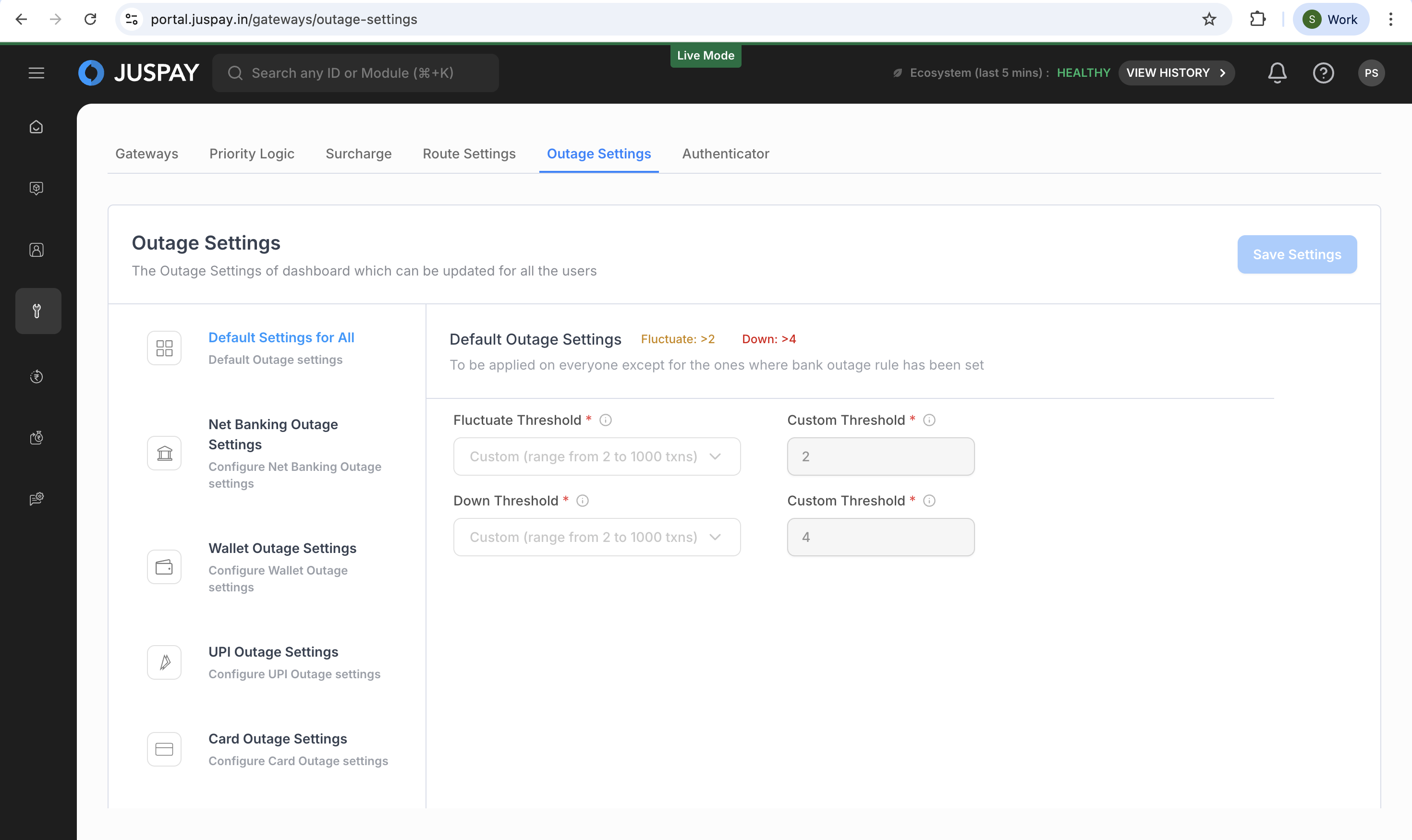
In the PG Control Center interface, you'll see multiple tabs at the top
Click on the "Outage Settings" tab
Prerequisites
Before accessing Outage Settings, ensure you have:
Valid merchant account credentials
Appropriate permissions (see Permissions and Roles section)
Active payment gateway configurations
Step-by-Step Usage Instructions
Configuring Default Settings
Step 1: Select "Default Settings for All"
In the left sidebar, click on "Default Settings for All" (first option)
This section controls the baseline outage detection for all payment methods
Step 2: Configure Fluctuate Threshold
Locate the "Fluctuate Threshold" dropdown (number of consecutive transaction failures to be considered for payment method fluctuation)
Choose from the available options:
Aggressive (5+ failures): Most sensitive, triggers after 5 consecutive failures
Default (20+ failures): Balanced approach, triggers after 20 consecutive failures
Lenient (45+ failures): Less sensitive, triggers after 45 consecutive failures
Custom: Allows you to specify a custom number between 2-1000 failures
If selecting "Custom", enter your desired failure count in the input field
Step 3: Configure Down Threshold
Locate the "Down Threshold" dropdown (number of consecutive transaction failures to be considered for payment method completely down)
Choose from the available options:
Aggressive (20+ failures): Quick detection, triggers after 20 consecutive failures
Default (45+ failures): Standard detection, triggers after 45 consecutive failures
Lenient (75+ failures): Conservative detection, triggers after 75 consecutive failures
Custom: Allows you to specify a custom number between 2-1000 failures
If selecting "Custom", enter your desired failure count in the input field
Step 4: Save Your Configuration
After making changes, the "Save Settings" button will become enabled
Click "Save Settings" to apply your configuration
You'll receive a confirmation message when settings are successfully saved
Configuring Payment Method Specific Rules
Step 1: Select a Payment Method Category
Choose from the available categories in the left sidebar:
Net Banking Outage Settings: For bank transfer payments
Wallet Outage Settings: For digital wallet payments (PayTM, PhonePe, etc.)
UPI Outage Settings: For UPI-based payments
Card Outage Settings: For credit and debit card payments
Consumer Finance Outage Settings: For BNPL and EMI options
Virtual Account Outage Settings: For virtual account payments
RTP Outage Settings: For real-time payment methods
OTC Outage Settings: For over-the-counter payment methods
Step 2: Configure Default Settings for the Category
The first accordion section shows "Default [PaymentMethod] Outage Settings"
Configure fluctuate and down thresholds similar to the global default settings
These settings apply to all payment methods in this category unless specific rules override them
Step 3: Add Specific Payment Method Rules (Optional)
Click the "[PaymentMethod] Outage Rule" button to add a new rule
This creates a new accordion section for specific payment method configuration
Step 4: Configure the New Rule
Select Payment Methods:
Click the payment method dropdown
Select one or more specific payment methods from the list
Selected methods will appear as removable chips
Set Fluctuate Threshold:
Choose from Aggressive, Default, Lenient, or Custom options
Configure based on the criticality of the selected payment methods
Set Down Threshold:
Choose from Aggressive, Default, Lenient, or Custom options
Typically set to be more sensitive than fluctuate threshold
Step 5: Manage Multiple Rules
Add More Rules: Click the "[PaymentMethod] Outage Rule" button again to create additional rules
Delete Individual Rules: Click the trash icon on any rule's accordion header
Delete All Rules: Use the "Delete All Rule" button to remove all custom rules
Special Considerations for UPI
Important Note: UPI payment methods have a simplified configuration:
Only default settings are available
You cannot create additional specific rules for UPI payment methods
The interface will not show "Add Rule" or "Delete All" buttons for UPI
Validation and Error Handling
The system automatically validates your configurations:
Threshold Validation
Custom threshold values must be between 2 and 1000
Fluctuate threshold must be less than down threshold
Fluctuate and down thresholds cannot be equal
Payment Method Validation
At least one payment method must be selected for each rule
The same payment method cannot be used in multiple rules within the same category
Form Validation
At least one setting must be changed before you can save
All validation errors must be resolved before saving is allowed
Permissions and Roles
Required Permissions
To access and use Outage Settings, you need:
View Access:
gateways_configuration permission (any level)
Users without this permission cannot see the Outage Settings tab
Modify Access:
gateways_configuration permission with ReadWrite access
Required to make changes and save configurations
User Roles and Access Levels
Merchant Admin:
Full access to view and modify all outage settings
Can configure thresholds for all payment method categories
May require approval workflow for changes (maker-checker process)
Maker-Checker Workflow
For certain account types, changes may require approval:
Maker: User who creates or modifies the configuration
Checker: User who reviews and approves the changes
Process: Changes are saved as "pending approval" until reviewed
Notification: You'll receive confirmation when changes require approval
Troubleshooting
Threshold Validation Errors
"Fluctuate Threshold should be between 2 to 1000"
Cause: Custom threshold value is outside the valid range
Resolution: Enter a number between 2 and 1000
"Down Threshold should be between 2 to 1000"
Cause: Custom threshold value is outside the valid range
Resolution: Enter a number between 2 and 1000
"fluctuate value should be less than the downtime value"
Cause: Fluctuate threshold is higher than or equal to down threshold
Resolution: Ensure fluctuate threshold is lower than down threshold
"fluctuate value and downtime value cannot be equal"
Cause: Both thresholds have the same value
Resolution: Use different values for fluctuate and down thresholds
Payment Method Validation Errors
"Payment Methods cannot be empty"
Cause: No payment methods selected for a specific rule
Resolution: Select at least one payment method for the rule
Form Validation Errors
"Update atleast one value to save settings."
Cause: No changes made to the configuration
Resolution: Modify at least one setting before attempting to save
API Response Messages
"Outage Settings Updated Successfully"
Status: Success confirmation
Action: Configuration has been saved successfully
"Outage Settings Updation Failed"
Status: Error occurred during save operation
Action: Retry the operation or contact support if issue persists
Use Cases
Use Case 1: Setting Up Aggressive Monitoring for Critical Card Payment Methods
Scenario: E-commerce merchant with high transaction volumes needs quick detection of card payment issues.
Configuration:
Card Outage Settings → Aggressive thresholds
Fluctuate: 5+ failures
Down: 20+ failures
Outcome: Ultra-fast detection of issues with critical payment methods.
Use Case 2: Configuring Lenient Thresholds for Wallet Payments During Maintenance
Scenario: Utility company wants to avoid false alarms during scheduled wallet maintenance windows.
Configuration:
Wallet Outage Settings → Lenient thresholds
Fluctuate: 45+ failures
Down: 75+ failures
Outcome: Reduced false alarms while maintaining actual outage detection.
Use Case 3: Managing UPI Outage Detection with Default Settings
Scenario: Food delivery platform processing high-volume UPI payments needs reliable monitoring.
Configuration:
UPI Outage Settings → Default thresholds only
Simplified configuration due to UPI's standardized nature
Outcome: Reliable outage detection without configuration complexity.