


Conflict Settings Management
Overview
The Conflict Settings feature allows administrators to configure how the system handles transaction status conflicts. This includes setting up notifications, defining auto-refund policies, and managing thresholds for various transaction types. This feature is intended for administrators who manage payment operations and need to ensure that transaction discrepancies are handled efficiently and automatically.
Accessing the Feature
To access the Conflict Settings page, follow these steps:
1. Log in to the dashboard.
2. Navigate to the Settings module from the main menu.
3. Click on the Conflicts tab.
4. The navigation URL is typically https://portal.juspay.in/settings/conflicts
Step-by-Step Usage Instructions
The Conflict Settings page is divided into several sections, each with specific configurations:
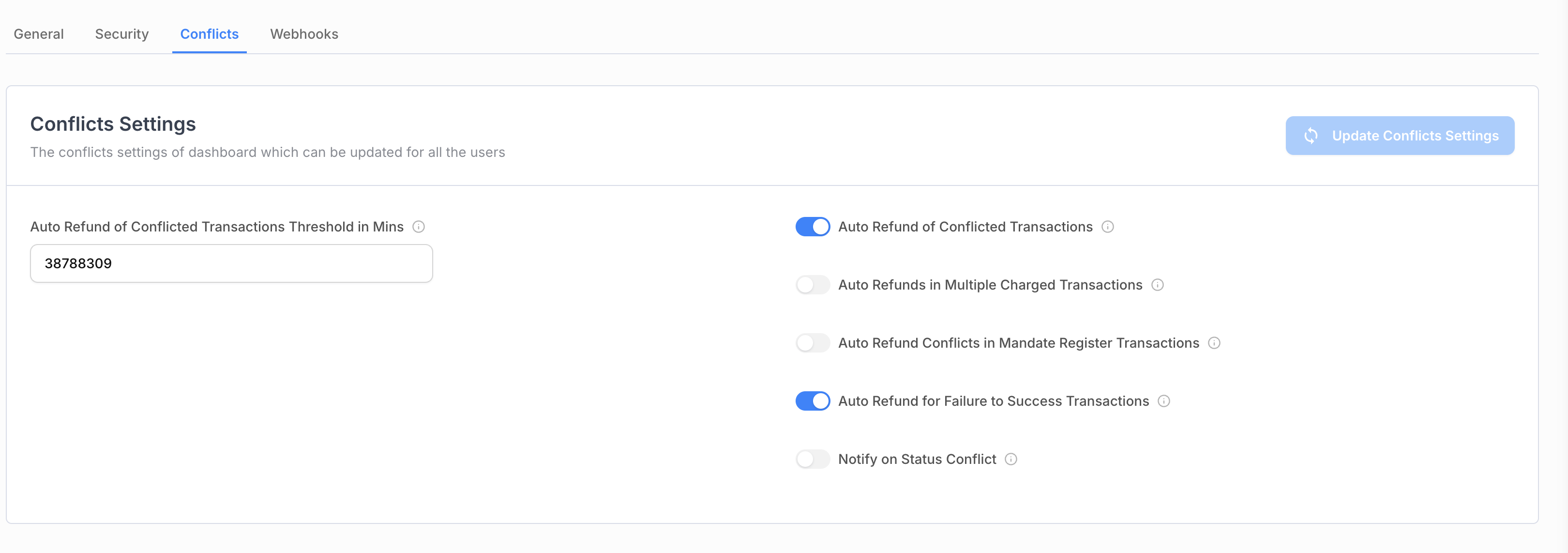
Conflicts Settings
This section allows you to configure the primary conflict resolution settings.
Auto Refund of Conflicted Transactions Threshold in Mins:
Description: Enter a threshold in minutes beyond which you would want us to automatically refund the transaction. The default threshold is 10 minutes. Transactions getting charged before the threshold will not be automatically refunded. Please align this threshold based on your fulfilment window.
Input Type: Numeric Text Input (allows only integers, max length 9).
Notify on Status Conflict:
Description: Choose whether you wish to be notified whenever a conflict occurs between the status in the system and the underlying PG with which we had processed the transaction.
Input Type: Boolean (toggle switch).
Conflict Status Email:
Description: If status conflict notifications are enabled, the notifications will be sent to the email address specified below.
Input Type: Text Input (email format).
Condition: This field is only visible and required if Notify on Status Conflict is enabled.
Auto Refund of Conflicted Transactions:
Description: Choose whether we should automatically refund the conflicted transactions. Please note that refunds are final and cannot be reversed, so exercise caution while setting this to true. Auto-refunds don't work for conflicted transactions in case of mandate register/mandate payment cases.
Input Type: Boolean (toggle switch).
Auto Refunds in Multiple Charged Transactions:
Description: Choose whether we should automatically refund the later transaction(s) in multiple charged transactions cases against a single order. Please note that refunds are final and cannot be reversed, so exercise caution while setting this to true.
Input Type: Boolean (toggle switch).
Auto Refund Conflicts in Mandate Register Transactions:
Description: Choose whether we should automatically refund the conflicted transaction(s) in mandate register transactions cases against a single order. Please note that refunds are final and cannot be reversed, so exercise caution while setting this to true.
Input Type: Boolean (toggle switch).
Auto Refund for Failure to Success Transactions:
Description: Choose whether you'd like to automatically refund transactions that transition from Failure to Success. This feature helps manage transactions that move from Failure to Success at any point, regardless of your fulfilment window. It allows your customers to seamlessly retry while Juspay handles the transition and triggers an auto-refund. Please note that once a refund is initiated, it is final and cannot be reversed, so we recommend exercising caution when enabling this option.
Input Type: Boolean (toggle switch).
PMT Wise Conflict Threshold Time For Mandate Register In Min
This section allows you to set payment method-wise conflict threshold t3mes for mandate register transactions. This section is only visible if Auto Refund Conflicts in Mandate Register Transactions is enabled.
Pmt Wise Conflict Threshold Time For Mandate Register:
Description: Select the payment methods for which you want to set a specific conflict threshold time.
Input Type: Multi-select dropdown.
Options:
Wallet Emandate Conflict Threshold Time
Aadhaar Emandate Conflict Threshold Time
Paper Nach Emandate Conflict Threshold Time
NB Emandate Conflict Threshold Time
Card Emandate Conflict Threshold Time
UPI Emandate Conflict Threshold Time
Card Mandate Conflict Threshold Time
[Payment Method] Conflict Threshold Time:
Description: For each payment method selected in the dropdown, a numeric input field will appear, allowing you to set the threshold in minutes.
Input Type: Numeric Text Input (allows only integers, max length 9).
Condition: These fields are only visible for the payment methods selected in the Pmt Wise Conflict Threshold Time For Mandate Register dropdown.
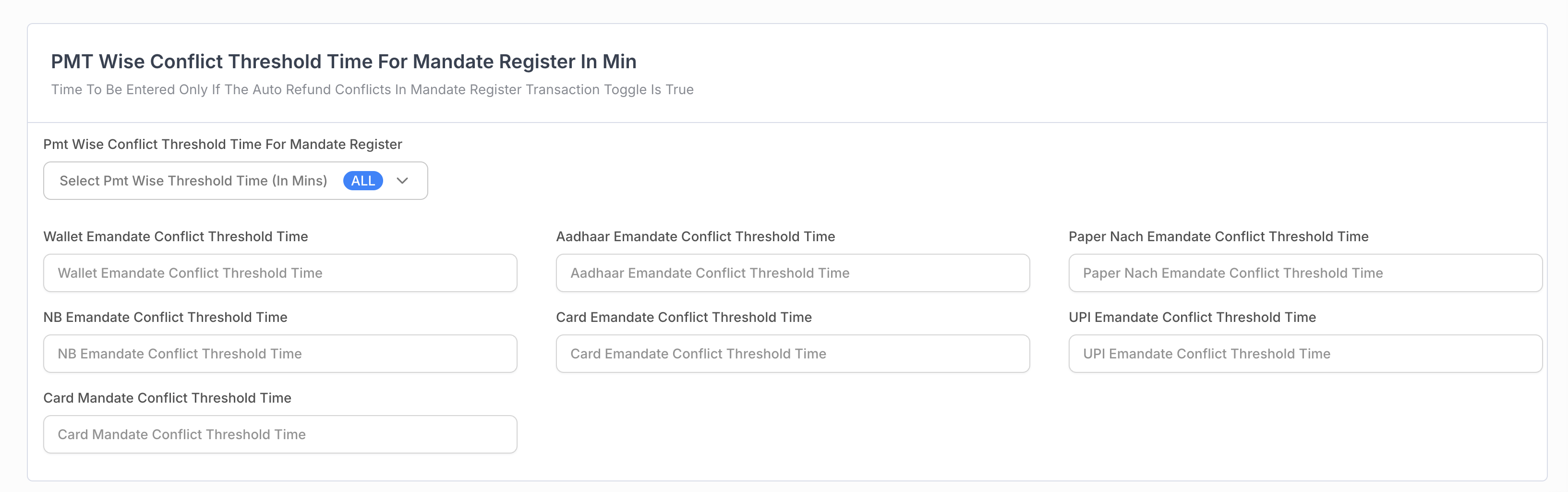
PMT wise conflict threshold time for mandate register in Minutes
Submitting the Form
Once you have configured the settings, click the Update Conflicts Settings button to save your changes.
If you are enabling auto-refund for the first time, a confirmation popup will appear to ensure you understand the implications.
Permissions or Roles
Access: To access the Conflict Settings page, you need the
settings_conflictpermission.Read-Only: If you have
Readaccess, you can view the settings but cannot make any changes.Read-Write: If you have
ReadWriteaccess, you can view and update the settings.Checker: If you are an admin or user with
Checkeraccess, you can approve changes made by others.