


Physical mandate specifications
Merchants enabled for physical mandates should follow these specifications and guidelines.
If your LotusPay account is enabled for physical mandates , you'll need to follow these specifications.
If LotusPay finds an image unsuitable or a data mismatch, the mandate will be returned to Pending status and you will be automatically notified by email to upload a corrected image or to resubmit it as a fresh mandate with corrected data.
General Specifications
LotusPay processes physical mandates basis a scan/photo of the original printed paper mandate.
The paper mandate must be physically signed with a pen. Digital signatures and image signatures are not permitted.
It is essential that the customer puts the same signature that is in their bank’s record. When physical mandates fail, it is usually because of signature mismatch.
The content of the physical mandate must match precisely with the content of the LotusPay Mandate object. 1) LotusPay-generated PDF mandates: These are generated after you create the LotusPay Mandate object, so they will match by definition. 2) Hand-written mandates and those on pre-printed stationery: You must create the LotusPay Mandate object with the same data as that which is contained in the paper mandate. Ensure that you write the LotusPay Mandate ID in the Reference 2 field.
Mandates that you send to LotusPay before 5pm on a working day will be submitted by LotusPay on the same day, else the next working day. Merchants with own sponsor bank: Contact LotusPay Support to know your sponsor bank’s cut-off time.
Even if you submit the scan mandate via LotusPay, some sponsor banks may require you to submit the original paper mandate to them within a certain time period for compliance and archiving purposes. Failure to do so would result in cancellation of the mandate. If you are required to do this, LotusPay will inform you when enabling your account for physical mandates. Merchants with own sponsor bank: Contact LotusPay Support to know your sponsor bank’s policy.
Print Specifications
When printing the mandate, ensure that the paper mandate meets the following specifications:
Mandate border measurements: 8’’ width by 3 ⅔’’ height. If you are printing LotusPay system-generated mandates, print the A4 page in portrait orientation to achieve the correct size.
Minimum paper thickness: 80 GSM.
Print quality: High
If you are printing LotusPay system-generated mandates, do not modify anything on the paper mandate. The only handwriting on the paper mandate should be the customer’s signature.
If you are required to submit the paper mandate to LotusPay for archiving purposes, the paper should be the same size as the mandate border, so you would have to cut around the border.
You may choose computer-generated mandates or handwritten mandates. For handwritten mandates, contact LotusPay Support if you need a template.
Image Specifications
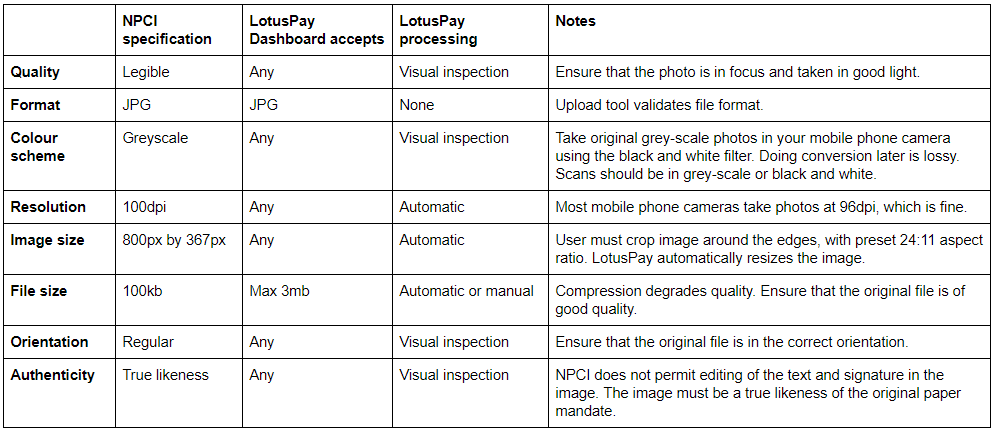
The table below outlines the image specifications for NACH Debit physical mandates. The closer your uploaded image is to the NPCI specification, the less image processing LotusPay has to do, the faster your mandates get submitted to the banking system. LotusPay does most of the image processing automatically, but some aspects need to be done manually and we visually inspect each mandate before submitting it.
LotusPay recommends using the Genius Scan mobile app to take photos of paper mandates. Genius Scan converts the photo into a scan-like image, and you can also push the image to cloud storage such as Google Drive, from which you can easily download it to your computer desktop and upload to the LotusPay dashboard.
Handwritten Mandate Specifications
If you are using your own fully hand-written or partially hand-written paper mandates (rather than LotusPay's system-generated fully pre-filled PDF mandates), then your mandate must meet the following requirements:
Date (optional): The date that the customer signed the mandate.
UMRN (leave blank): Not permitted for CREATE.
Sponsor Bank Code (required): Must be a valid NACH Bank IFSC code for the selected sponsor bank in your NACH Profile.
Utility Code (required): Must be a valid NACH utility code in your NACH Profile.
Creditor Name (required): Must be the name paired with the NACH utility code, as recorded by NPCI.
Account Type (required): The type of the customer's bank account. Must be one of Savings, Current, Cash Credit, Savings NRE, Savings NRO or Others.
Bank (required): The name of the customer's bank. Must match the stated branch IFSC.
IFSC (required): The branch IFSC code of the customer's bank account. LotusPay does not accept MICR codes.
Amount in Words (required): The amount written in words.
Amount (required): The amount written in numbers.
Frequency (required): The frequency with which payments will be taken.
Debit Type (required): Whether the amount to be debited is a fixed amount or a maximum amount.
Reference 1 (required): The merchant's identifier for the mandate or customer.
Reference 2 (optional): The merchant's identifier for the mandate or customer. For selected sponsor banks, Reference 2 must contain the LotusPay Mandate ID.
Phone No. (optional): The customer's mobile number.
Email ID (optional): The customer's email address.
Period From (required): The first collection date of the mandate.
Period To (optional): The final collection date of the mandate. Nil value together with the 'Until cancelled' box being checked means the mandate continues until cancelled.
Name (required): The name recorded in the customer's bank account.
Signature (required): The original wet signature of the customer. Must match the bank's records.