


API eMandate authorisation modes
Customers authorise NACH Debit mandates on your branded page on the LotusPay secure site. API eMandates can be authorised via the customer's net-banking login, or debit card and PIN, or Aadhaar number. Customers have to agree to the NACH consent.
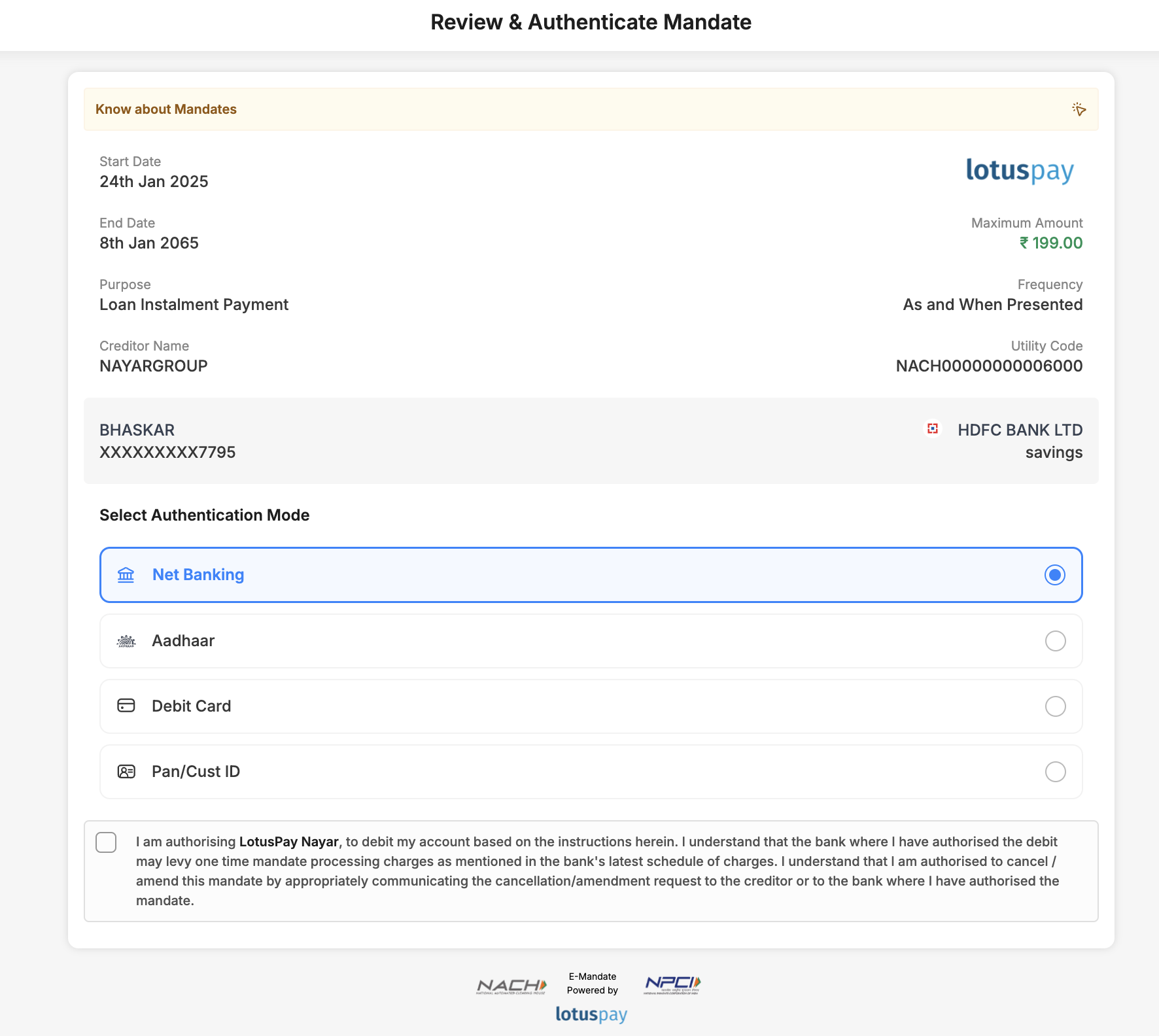
Whatever route customers go through, they will land on your electronic mandate ('eMandate') authorisation page on our secure website. This page is branded with your company's logo and name. On this page, the customer checks the mandate details, agrees to the NACH consent, and proceeds with authorising it.
'API eMandates' are the type of eMandates that are created via NPCI's API gateway. They are authorised via net-banking login, or debit card and PIN, or Aadhaar number. The customer should already have access to internet banking, or they should have their debit card details and know their PIN, or they should have Aadhaar number updated in their bank account.
The authorisation modes available for a particular destination bank depend on whether that bank has enabled that auth mode i.e. if they have integrated that auth mode with NPCI. For a full list of live banks and authorisation modes, please see the NPCI website .
.
NPCI operates a general policy that a NACH bank may go live as a sponsor bank for a particular auth mode only after they have first gone live as a destination bank for that auth mode.
General prerequisites for API eMandate:
The customer must have their mobile number updated in the bank account.
The customer must have their mobile number available to receive the OTP.
The Mandate variants and types article explains how you can identify the mandate variant and auth mode by specific characters in the UMRN.
Auth mode: Net-banking
If the customer selects the net-banking method of authentication, the customer will be directed to their bank's secure internet banking portal. Here they log in, accept their bank's terms and conditions, and authorise the eMandate.
Prerequisites:
The customer should have their netbanking login.
The bank account must be mapped to this netbanking login.
The netbanking login must have transaction rights.
The customer must have their mobile number updated in the bank account.
The customer must have their mobile number available to receive the OTP.
Auth mode: Debit card
If the customer selects the debit card and PIN mode of authentication, they will be redirected to enter their debit card details.
There are two sub-types of debit card auth mode:
a) Destination bank website: Customer crosses NPCI ONMAGS interstitial page and lands on the destination bank debit card page. Here they enter their debit card details and OTP.
b) NPCI ONMAGS website: Customer lands on NPCI ONMAGS debit card page. Here they enter their debit card details and OTP. A few destination banks have migrated to this because it is a cleaner experience for the customer. In the NPCI website live banks list, the destination banks marked as Live API are the ones that have opted for this sub-type.
In both sub-types, the customer can enter their debit card details and PIN number, accept their bank's terms and conditions, and authorise the eMandate.
Prerequisites:
The customer should have their debit card and PIN.
The bank account must be mapped to this debit card.
The debit card must have transaction rights.
The customer must have their mobile number updated in the bank account.
The customer must have their mobile number available to receive the OTP.
Auth mode: Aadhaar
If the customer selects the Aadhaar mode of authentication, they will be redirected to the NPCI ONMAGS website. There they must first enter their Aadhaar number and OTP. This verifies the customer's identity via eKYC from UIDAI. ONMAGS then sends a server-to-server API request to the destination bank to approve the mandate. The bank checks that the bank account details and Aadhaar number sent by NPCI are also linked in the bank's database. Then the bank sends an OTP to the customer, and the customer must enter this OTP on the ONMAGS page to authorise the eMandate.
Prerequisites:
The customer should have their Aadhaar number.
The bank account must have this Aadhaar number updated in it.
The customer must have their mobile number updated in the Aadhaar.
The customer must have their mobile number updated in the bank account.
The customer must have their mobile number available to receive the OTPs.
Simplified Aadhaar Flow
Here, for max amount less that 15000, Its only Bank OTP, there is no UIDAI OTP. Most banks are live on simplified aadhaar
Auth mode: Pan/ Cust ID
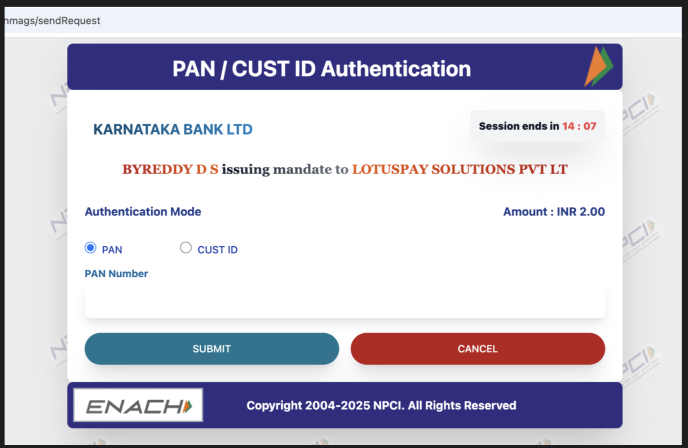
This is simplified mandate flow and is applicable only if the max amount is less than 15000.If the customer selects the Pan/ Customer ID mode of authentication, they will be redirected to the NPCI ONMAGS website. Customers can select either PAN or Cust ID, which is the bank customer ID. If the customer has selected PAN, customer has to enter his PAN. If Cust ID is selected, customer has to enter the Bank customer ID. Then the bank sends an OTP to the customer, and the customer must enter this OTP on the ONMAGS page to authorise the eMandate.
Prerequisites:
The bank account must have PAN updated in it.
The customer must have their mobile number updated in the bank account.
The customer must have their mobile number available to receive the OTPs.
User Flow
On Lotuspay checkout flow, user has to select Pan/Cust ID auth mode.
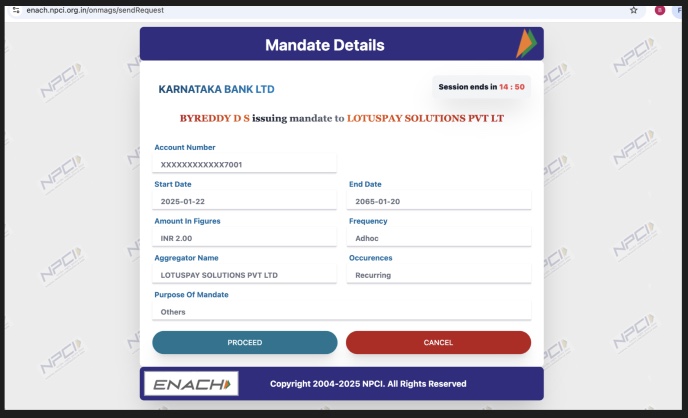
Upon clicking on proceed in Lotuspay page, user will be redirected to NPCI page. User has to click on Proceed.
User has the option to either select PAN or Cust ID with help of radio button and enter PAN number or Bank Customer ID.
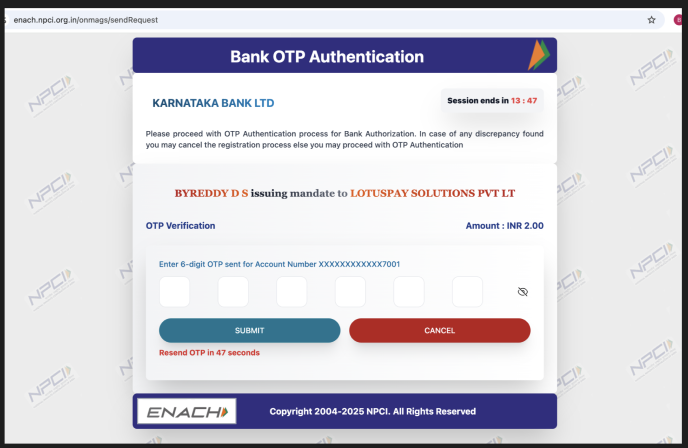
User has to enter the OTP received on his mobile number and submit.
Upon successful Pan/ Cust ID and OTP verification, the mandate will be registered.
NACH Debit consent
The customer must agree to the NACH Debit consent. This is a requirement from the National Payments Corporation of India wherein the customer is giving consent for direct debit of their bank account. The text is as follows:
I am authorising LotusPay, on behalf of [MERCHANT NAME], to debit my account based on the instructions herein.
I understand that the bank where I have authorised the debit may levy one time mandate processing charges as mentioned in the bank's latest schedule of charges.
I understand that I am authorised to cancel/amend this mandate by appropriately communicating the cancellation/amendment request to [MERCHANT NAME] or the bank where I have authorised the mandate.
Most banks do not charge their customers for setting up mandates on their bank accounts.