


API eMandate checkout flow
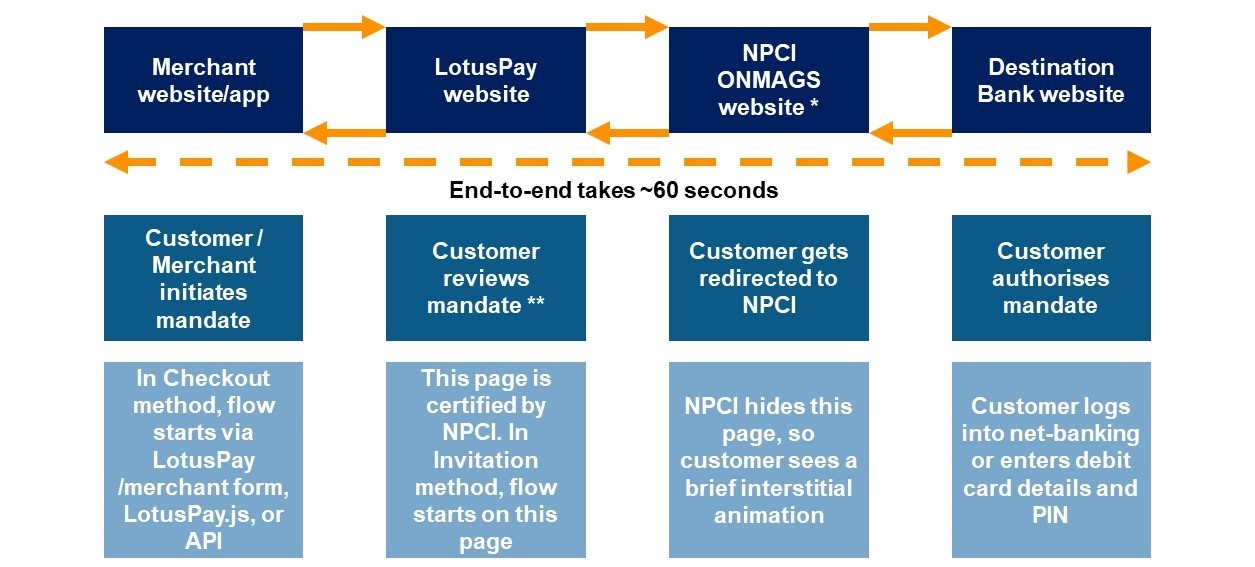
LotusPay has as direct integration with NPCI for API eMandate variant. NPCI offers browser-to-browser APIs for the customer check-out flow:
Step 1: Corporate’s website/mobile app
Step 2: Forward to LotusPay mandate summary page
Step 3: Forward to NPCI ONMAGS gateway
Step 4: Forward to destination bank website
Step 5: Back to NPCI ONMAGS
Step 6: Back to LotusPay
Step 7: Back to corporate’s website/app
The API integration guide has a more detailed technical explanation.
Summary
This flow requires that the customer completes the check-out flow from end to end. You should encourage customers to follow through with the redirection until they have reached back to LotusPay or your website/app.
The destination bank checks that the customer whose bank account details are included in the source is the same customer who is logging in via net-banking or debit card and PIN or Aadhaar number. This means the net-banking login or debit card or Aadhaar number must belong to the same customer relationship as that bank account, otherwise the destination bank will reject the request.
Errors
If a customer says/shows that they saw an error message on the destination bank website, and the source status is still showing as pending in LotusPay without any error, you can be sure that it is a ‘dropped case’ i.e. the customer did not return from the destination bank to NPCI. In such cases we recommend that you ask the customer to repeat the flow until they return to LotusPay, so that we can capture the response and display it to you. If there is an error, it will be displayed in the response key.
Step 5 details:
The destination bank will record the eMandate authorisation after the customer enters the OTP on the bank website. However, for all parties the source of truth of the mandate’s actual status is NPCI’s Mandate Management System (MMS). The eMandate is not actually active until NPCI captures the successful response in ONMAGS and creates the mandate in MMS.
Customers may see errors on the destination bank website in Step 5. This is not in our control. If there were an error in our request, the customer would not even get beyond Step 4 ONMAGS.
The article Authorisation errors in API eMandate explains errors in detail, and includes error codes and the differences between NPCI rejections and destination bank validations.
LotusPay does not have any more information than what is given in the error.
Failures after successfully entering OTP
If a customer says/shows that they saw a success message on the destination bank website, or if your sponsor bank has reported that a particular mandate request has created an active mandate, but the source status is still showing as pending in LotusPay:
1. In most cases, it is a ‘dropped case’ i.e. the customer did not return from the destination bank to NPCI. In such cases we recommend that you:
Try to check out again with the same source link. If the destination bank has updated NPCI in the background then our system will automatically capture that and mark the source as submitted without redirecting the customer to NPCI. If the customer is able to reach NPCI again, then the destination bank did not update NPCI in the background. In such cases we recommend the option below.
Send a new source request to the customer and remind them to carefully complete the check-out completely from end to end.
2. In some rare cases, it may be a technical rejection by NPCI of the destination bank's response. See Authorisation errors in API eMandate for more details and how to report this.
Step 5 details:
The destination bank will record the eMandate authorisation when the customer enters the OTP on the bank website. However, for all parties the source of truth of the mandate’s actual status is NPCI’s Mandate Management System (MMS). The eMandate is not actually active until NPCI captures the response in ONMAGS and creates the mandate in MMS. If the customer does not return from the destination bank to NPCI then NPCI cannot capture the response and will not activate the mandate.
If a customer enters the OTP on the bank website and closes their browser, there will be a mismatch in what the bank has recorded as a successful eMandate authorisation, and what is actually recorded in NPCI as an active eMandate.
For this reason NPCI has launched server-to-server APIs for destination banks to update NPCI of such ‘dropped cases’. As of February 2021, approximately 25 destination banks have gone live on these server-to-server APIs, and the remainder are in process.
Therefore it is essential that you advise the customer to return to NPCI from the bank website. Some banks ask the customer to wait a few seconds before redirection, so the customer should adhere to this.
Step 6 details:
A similar redirection drop could potentially occur between ONMAGS and LotusPay on the return flow (Step 6). NPCI has also given us server-to-server APIs for capturing the response from ONMAGS, and we have integrated these APIs. LotusPay automatically updates such ‘dropped cases’ exactly five minutes from Step 3. Therefore this would not be a point of failure. However, NPCI and LotusPay are both dependent on the destination bank giving NPCI the authorisation status, so it’s essential that the customer returns from the destination bank to NPCI (Step 5).
Step 7 details:
A similar redirection drop could potentially occur between LotusPay and the merchant website/mobile app. For this reason LotusPay has given merchants webhooks and status query APIs. See the eMandate integration guide for more details.
Destination bank fees:
Note that some destination banks charge customers for eMandate registration. If the customer enters the OTP but does not return to NPCI then the customer will be charged by their bank but the eMandate would still not be activated in NPCI. In such cases the customer should ask the bank to reverse the charge.