


Offers
Juspay Offers Module will help the merchant with flexible configuration and management, enhance payment journey for the users with customized UI and various benefits.
Offer Benefit types
Users will get benefit of offers on the below ways,
Cashbacks: This is a standard benefit where there is a refund of a small percentage of the transaction value to a customer.
Instant Discounts: Users receive discounts on the total cart value, with Juspay adjusting the transaction amount before forwarding it to the payment gateways (PGs).
Different format of Offer Promotions:
1. Coupon based
Customers can choose from a predefined list of coupon-based offers enabled by you. This fixed list is visible to all users.
Hidden Coupon Functionality: Customers can manually enter or paste the coupon code you have shared just with targeted users via in-app notifications, SMS or email.
Multi coupon code: Create multiple unique coupons against one offer for offer application across their partners. This option is available in cases when the offer is created as a hidden coupon.
2. Non-coupon based
These offers are automatically applied during checkout with no intervention from the customer.
Offer Display
Eligible offers appear below the respective payment instruments on the Juspay Payment Page. If the Coupons/Offers screen is enabled, users can also view a list of auto-applied offers available to them. The same list is shown on the Add Card screen for added visibility.
Offer Application:
When a user selects a payment instrument linked to an offer:
The discounted amount is displayed on the Payment Page.
For instant discount offers, the description text updates to confirm that the offer has been applied.
During the transaction, the offer is automatically validated and applied. The user pays the updated (discounted) amount.
Offer Validation Failure
If offer validation fails, a retry popup is displayed. The popup provides the user with two options:
Remove the offer and proceed with the transaction.
Return to the payment screen to choose a different payment method.
3. Payment locking via Offers
Merchants can enable offers on the Pre-Payment (Order Summary) page using two approaches:
Merchant Discount
Pre-Applied Coupons
Both approaches ensure that the offer applied before payment is locked during the payment flow on Juspay’s Payment Page, maintaining a consistent offer experience for users.
3.1. Merchant Discount
In this approach, the merchant handles all benefit calculations on the Pre-Payment page, while Juspay handles payment locking on the Payment page.
Configuration Steps
Configure Offer on Juspay Dashboard
Create the same offer (with the same offer code) on the Juspay Offers Dashboard.
Set:
Coupon-based Offer = Yes
Offer Benefits = Payment Locking via Offer
Select the payment instruments for which the offer should apply.
Include Offer Code in Order Payload
Pass the offer code in the order_details payload when creating the order.
Payment Page Behavior
The Juspay Payment Page displays a “Coupon Applied” banner.
Payment Locking occurs automatically based on the configured offer details.
Users cannot remove or change the offer from the payment page. To modify or remove it, they must return to the Pre-Payment page.
Offer Validation
During the transaction, the offer_id is included in the /txns call and validated on Juspay’s backend.
If the offer validation fails, a Retry Popup appears:
The popup allows users to retry the payment on the same page with the applied offer.
A corresponding event notification is also sent to the merchant when the retry popup is triggered.
3.2. Pre-Applied Coupons
In this approach, the merchant uses the Juspay listOffers API on the Pre-Payment page to show applicable offers to the user.
Flow Overview
The user views and applies an offer on the Pre-Payment page.
The discounted amount is displayed there, but the merchant still sends the original order amount and applied offer details in the order_details payload to Juspay.
On the Juspay Payment Page:
The Coupon Applied banner is displayed.
Benefit Calculation and Payment Locking occur automatically based on the dashboard configuration.
Users cannot remove the offer on the payment page — they must go back to the Pre-Payment page to modify or change it.
Offer Validation
The offer_id is passed in the /txns call for backend validation.
If validation fails:
The Retry Popup is displayed with an option to retry payment using the same offer.
A retry event is also triggered and sent to the merchant.
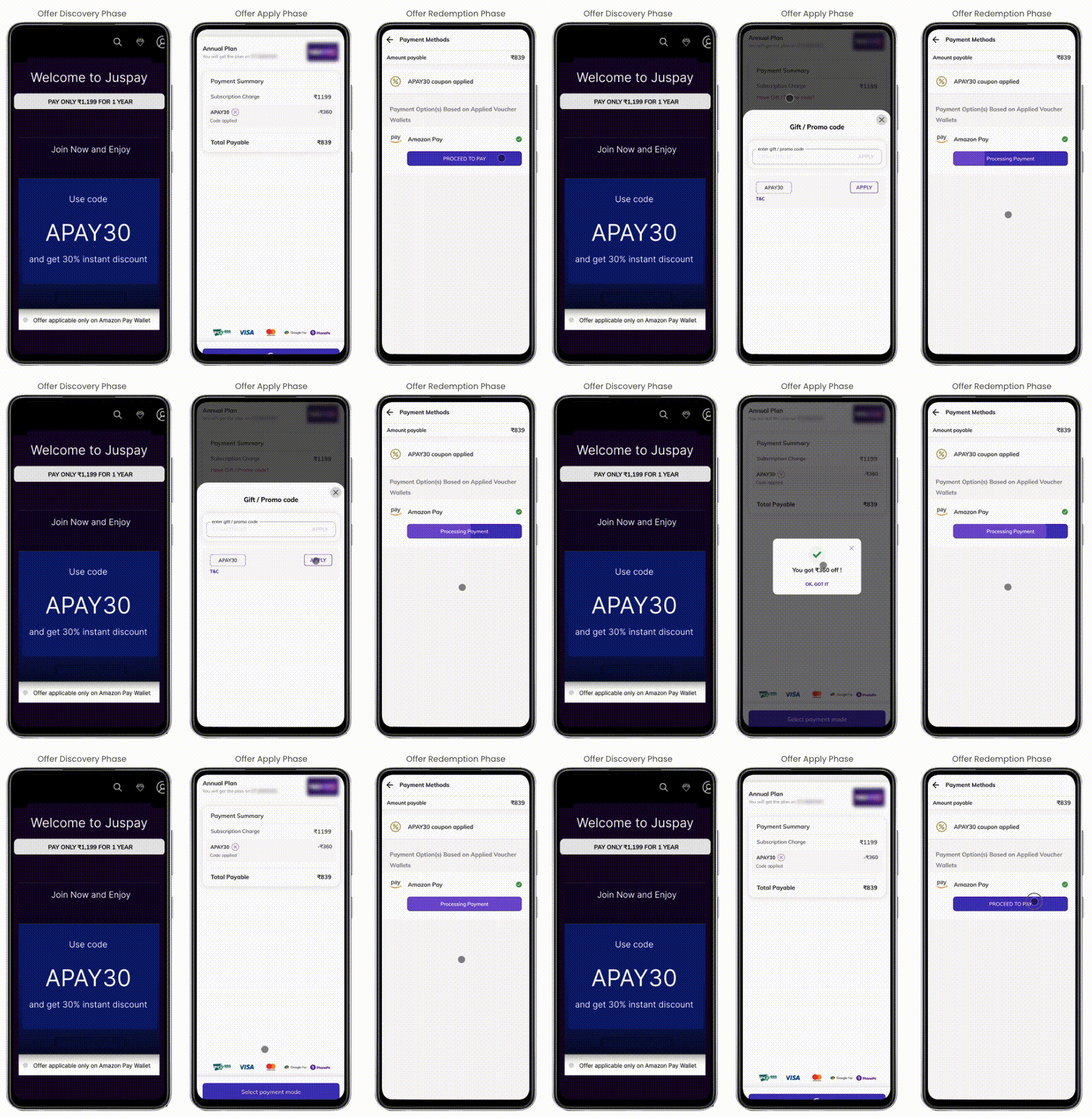
Flexible Offer Configurations
The Juspay Offers Dashboard allows merchants to create, view, update, and manage offers efficiently.
Juspay’s flexible configuration options support a wide range of business needs, from personalized user campaigns to time-sensitive promotions.
For example:
To reward specific customers, select Customer-Based Offer and upload a user list via customer ID or phone number.
To promote bank tie-ups, choose Payment Method-Based Offer and specify the eligible bank or card network or card Bins. Detailed description and configuration steps can be referred here

For business specific requirement, White list UDFs on the dashboard. Detailed description and configuration steps can be referred here
Watch Out
Batch offers can be created up to 100 offers using a .csv file.
For cashbacks, the effective offer amount will not be reduced. Merchant has to settle the cashback with the bank/gateway.
Analytics and Reporting
We have a separate dashboard for Offer Analytics. Here merchants can monitor the success rate,performance and take decisions on future campaigns.