

2. Handle Payment Response
Step 2.1.
Handle Redirection Response from Bank Page
Step 2.2.
Check Order Status
Step 2.3.
Display Payment Status

Post payment completion, the user will be redirected to the Payment Redirect URL configured on Juspay Dashboard. Please configure a valid https url on the Juspay Dashboard > Settings > Payment Redirect URL to enable this flow.
After being redirected to return_url from bank page, it is mandatory to do a Server-to-Server Order Status API call to determine the final payment status. Please ensure that you verify the order ID and amount transaction.
Sample return_url: https://merchant.shop.com/?status_id=21&status=CHARGED&order_id=guest-test-26&signature=wCFja5ZtDzm687LUxkqlw1NQYraC%2Bz540CitnlCouYI%3D&signature_algorithm=HMAC-SHA256
To understand how to handle payment status, refer to this section
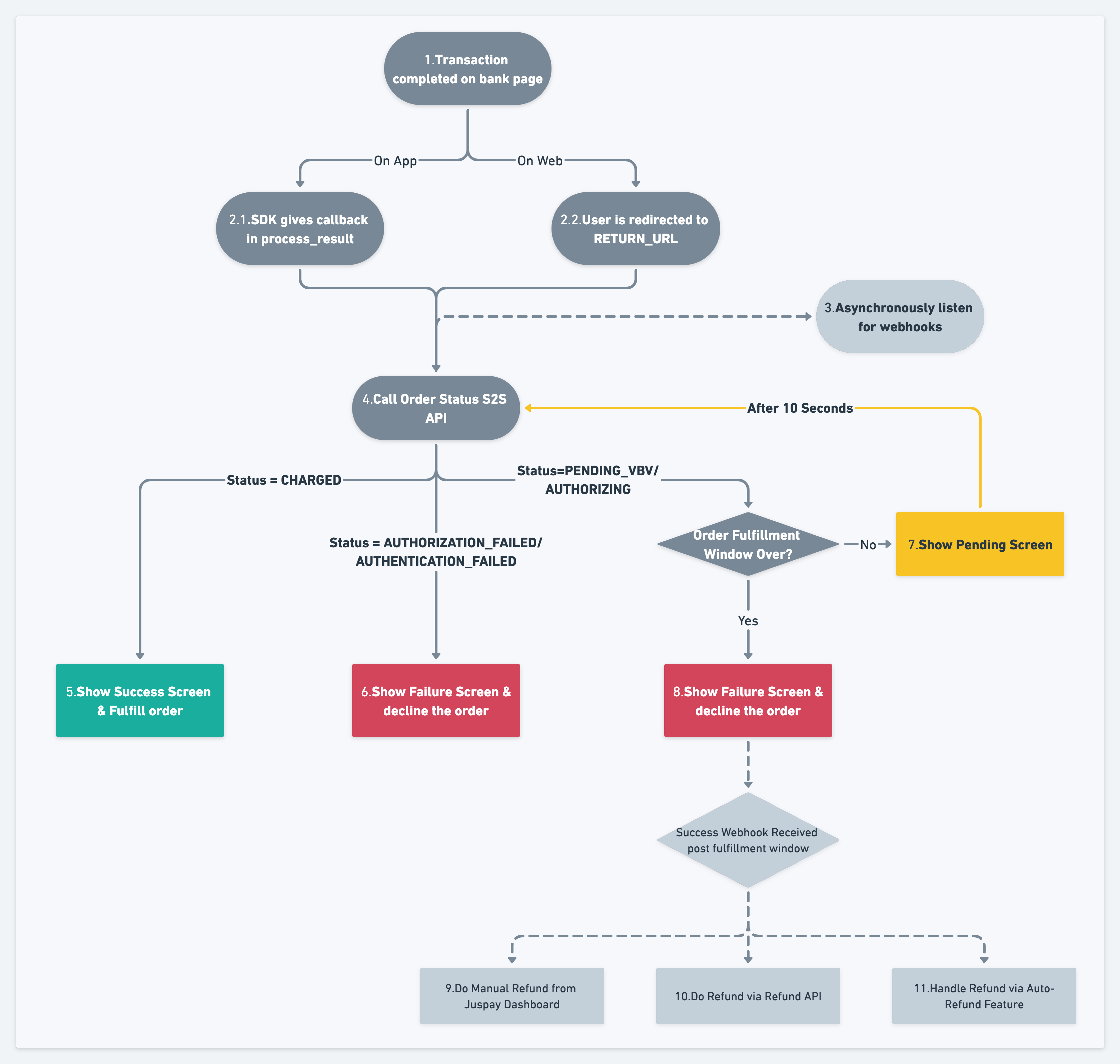
Once the payment status is determined via the API, the final status should be displayed to the user. This screen needs to be handled by the merchant, it is not provided by the SDK