


Token repeat transaction flow
Token transactions
The token transaction will be processed exactly as saved card transaction is processed. There will be no change in merchant integration
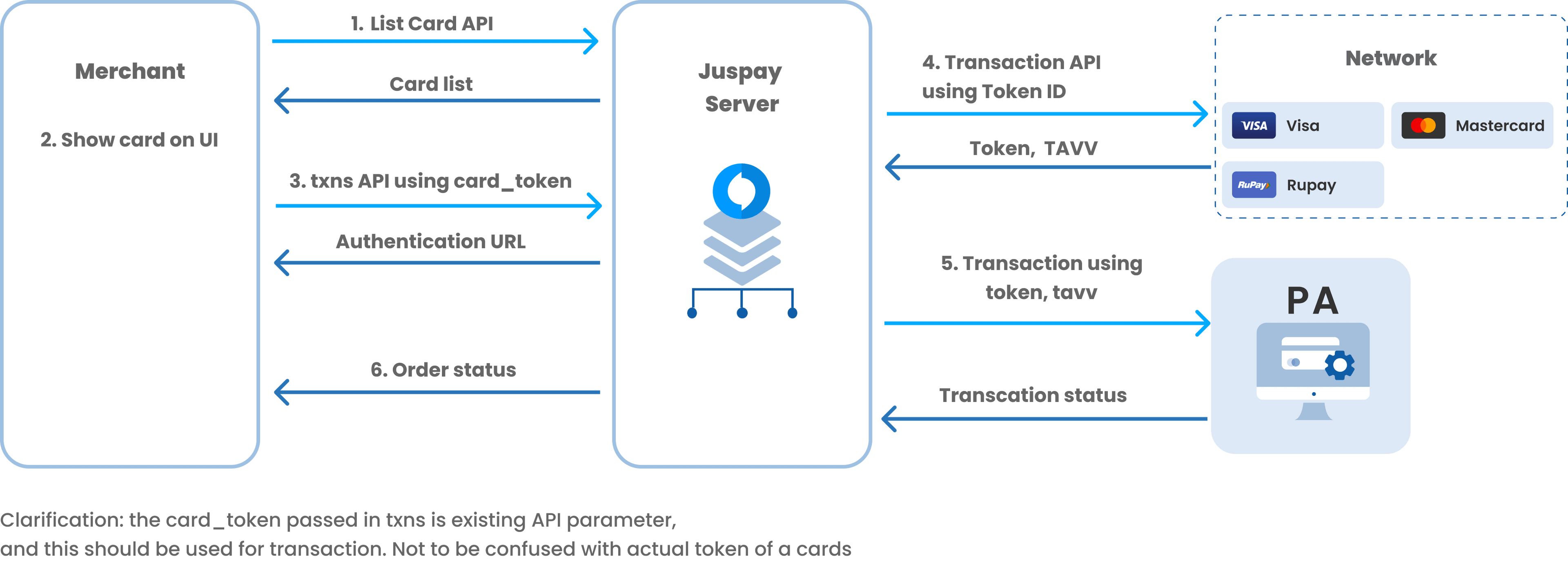
1. List the stored card
Call List Card API to show the cards on Payment Page, the same API will also give the tokenized cards in the current format.
2. Show card to user
The card_number parameter is used to show the masked card information to the user. Currently the format for this field is "4012-XXXXXXXX-9454", once repeat token transaction is enabled for the merchant the format will change to "XXXX-XXXXXXXX-9454".
End users are not exposed to tokens, they will still see card details on payment page. Hence, the card_expiry and card_last_four digits will still be stored even after card is tokenized.
3. Start Transaction
There is no change in /txns API for a stored token transactions.
API specification
List Card API
|
Name
|
Format
|
Description
|
|---|---|---|
provider_category
| String
| Card storage provider category. Example: VAULT | NETWORK_TOKEN | ISSUER_TOKEN
|
provider
| String
| Provider's name. Example: JUSPAY | VISA | SODEXO
|
After Token Repeat Transactions are enabled for merchant_id then for all cards (tokenized/ non tokenized) the List Card API will return back card_number in new masked format.
This is to ensure consistency on UI for the end user
/txns API
There are no changes in the /txns API for a current saved card vs a saved token flow.
Order Status API
In the existing card block merchant will receive two new parameters using_token = true and a new token block. Merchant will continue to receive all other existing parameter.
If there is a use case to show the Payment Instrument used then card. last_four_digits should be used.
Order Status extra fields description
|
Name
|
Format
|
Description
|
|---|---|---|
using_token
| boolean
| true if the transaction was done via token, else false
|
token
| JSON
| token block is sent back to merchant if it was a saved token transaction
|
token.card_reference
| String
| Juspay's permanent reference to the token generated.
|
token.last_four_digits
| String
| Token's last four. Should not be shown to the user. If there is a requirement then card's last_four_digits should be shown
|
token.card_fingerprint
| String
| A string that uniquely identifies the card/tpken across the board. When the same card/token is stored across multiple accounts, same fingerprint will be returned. This can be used to identify duplicates.
|
token.card_isin
| String
| Token's BIN. Should not be shown to user. Can be used for routing etc
|
token.expiry_year
| String
| Token's expiry year. This can be different from card's expiry year. Merchant should still use card's expiry year
|
token.expiry_month
| String
| Token's expiry month. This can be different from card's expiry month. Merchant should still use card's expiry month
|
token.par
| String
| The PAR value as is received from the network. Can be used to check uniqueness of cards for use case of Offers, EMI etc.
|
token.tokenization_status
| String
| The current status of token.
|
Webhook
The extra parameters/blocks added in Order Status API will be added in webhooks also.