


Native OTP
Native OTP is a feature, enabling merchants to accept a one-time password (OTP) on the app without redirecting users to a bank page. In addition, the OTP shall be auto-detected and auto-populated thereby improving conversion rates.
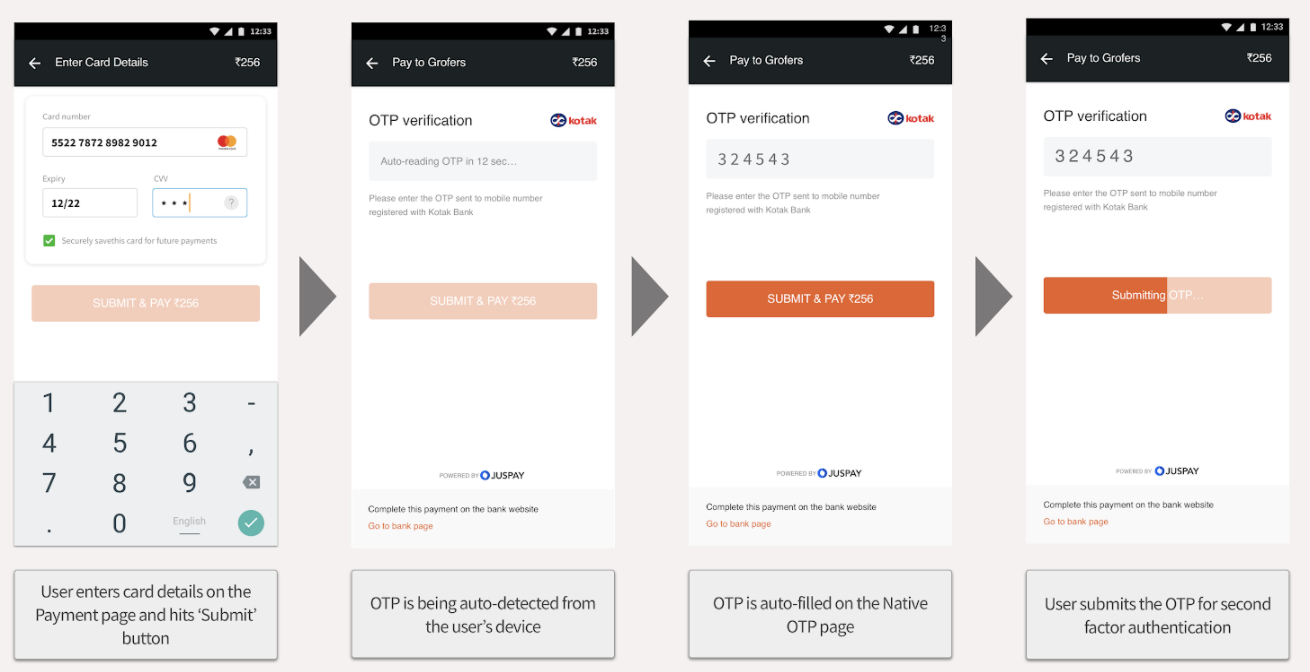
Step 1 - Order creation
Create Order on Juspay Servers.
Step 2 - Check card eligibility
Perform the Eligibility SDK call to verify eligibility of the card details entered by the user for Native OTP transactions. Refer Code Snippet on the right for more details.
If the card is eligible, continue with Step 3
If the card is not eligible for Native OTP, please perform a cardTxn for 3DS flow (i.e. without including Native OTP specific parameters)
Step 3 - Initiate card transaction with Native OTP experience
If the card is eligible for Native OTP transactions, perform cardTxn SDK call, ensuring below additional parameters.
authType :: OTP
amount :: 100 (pass the amount to be displayed on the Native OTP screen)
cardBin :: 552365 (pass the cardBin used for the transaction)
Hyper SDK provides the flexibility to brand the Native OTP page with Merchants’ branding guidelines. Below are the list of design variables which may be configured for the Native OTP page.

|
S.No
|
Configuration
|
Sample Value
|
Description
|
|---|---|---|---|
1
| submitButtonColor
| '#28B3E3'
| Color of Submit OTP and Pay button
|
2
| resendColor
| '#28B3E3'
| Resend Button Color
|
3
| background
| '#ffffff'
| Sets the background of colour of the app and Submit button’s label color
|
4
| toolbarTextColor
| '#333333'
| Color of toolbar text
|
5
| primaryFont
| 'Arial'
| Primary Font Type
|
6
| toolbarTextSize
| 18
| Size of toolbar text
|
7
| toolbarTextFontFace
| toolbarTextFontFace
| Font face for toolbar text
|
8
| cornerRadius
| 5.0
| Corner radius for buttons and edit text elements
|
9
| otpEditTextBackground
| '#F5F6F7'
| Background color of edit text element
|
10
| headerText
| 'Pay to '
| Heading to be displayed on toolbar
|
11
| merchantName
| 'Swiggy'
| Merchant Name to be displayed on toolbar
|
12
| isTextInAllCaps
| false
| Should the Text be in all caps. If marked as false the text shall be in sentence case
|
13
| isFullScreenActivity
| false
| This shall be true in case the full screen is controlled by Juspay Native OTP UI.
|
14
| toolbarBackground
| 'toolbar_background'
| Background colour of the toolbar
|
15
| toolbarBackImagE
| 'toolbar_back_arrow'
| Image for the back arrow button on toolbar (if any)
|