


SIMPL Paylater
Please write to your account manager at SIMPL to get the wallet enabled for your account and get the app id.Just like any other payment method, SIMPL can be enabled directly by the merchant using the dashboard.
Juspay Dashboard
Ensure that you are using the latest Juspay Express Checkout dashboard. Links below for reference
Redirection URL configuration at Simpl
Please ensure that below callback URL’s are configured at SIMPL
Sandbox: https://sandbox.juspay.in/v2/reg/gateway-response/<merchant_id>/simpl
Production: https://api.juspay.in/v2/reg/gateway-response/<merchant_id>/simpl
Replace the merchant_id in the above URL with the actual merchantId provided by Juspay.
Android
Contact your Juspay integration SPoC to have SIMPL added as a feature for your client ID.
SDK version: Refer to the release notes for the most recent SDK version here.
Then add the Simpl Fingerprinting SDK as a dependency.
Verify that you are loading the Simpl Fingerprinting SDK properly by logging
Log.d("SimplFingerprint", SimplFingerprint.getInstance().toString());
in the Logcat console. You should receive an Object in return.
iOS
SDK version: Refer to the release notes for the most recent SDK version here.
And install the following cocoapods dependency for Simpl SDK
Create Customer
The merchant has to first call the create customer API from their server to create a customer at Juspay. Mobile number is mandatory for creating customer.
For specific details, please refer the documentation provided here.
Get Customer
Get customer API will return all the customer-related information for previously added customers.
For specific details, please refer the documentation provided here.
Create Order
Create an order that is a representation of your shopping cart. The order contains important information like amount, customer details, shipping address, billing address, etc. Only after an order is created, payment can be started. Refer code snippets on the right for Sample order create curl for Simpl.
For specific details, please refer the documentation provided here.
Check eligibility
Eligibility API is required to check if the user is eligible for using the respective wallet. Based on the response from Eligibility API, the merchant can show the wallet option in the UI. The operation checks the eligibility for the number present in the create customer API. Order id or amount is mandatory for eligibility check.
Create Payload to call Eligibility API. Refer code snippets on the right for reference.
|
Scenario
|
User experience handling
|
|---|---|
User not eligible to transact on Simpl
| Disable Simpl option with appropriate user messaging
|
Insufficient wallet balance to transact on Simpl
| Disable Simpl option with appropriate user messaging
|
User is eligible to transact on Simpl
| Enable Simpl option, display wallet balance
|
Refresh wallet balances
Use the refreshWalletBalances call to get the list of wallets available for the user. The response shall provide information on:
Whether Simpl wallet is already linked for the customer
The direct wallet token obtained in the response shall be used in the walletTxn call.
Transaction initiation
If a wallet account is present, obtain the wallet direct debit token from the refreshWalletBalances call response and call the operation walletTxn. Refer code snippets on the right for reference.
First time users where the wallet account is not created at Juspay, there won’t be any wallets listed in refreshWalletBalances. Then call the transaction without the direct debit token. Refer code snippets on the right for reference.
NoteIf the wallet account exists and the direct debit token is not passed then the transaction fails.
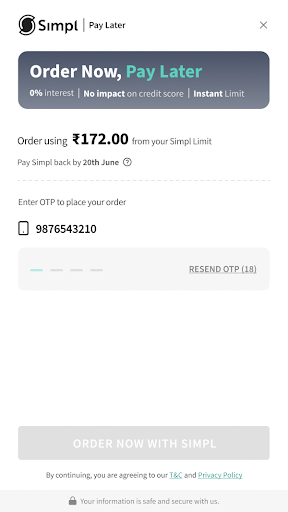
The user will now be redirected to the SIMPL page where the user has to link the account by entering the OTP as shown below. Now the transaction would be Successful and redirects back to the merchant app.
.png)
First time user: Simpl wallet will be displayed on the payment page, if the user is eligible to transact on Simpl. On choosing Simpl, the user will be redirected to Simpl page to enter mobile number, verify OTP and authorize the payment.
Repeat user: In case of a repeat user eligible to transact on Simpl, the payment page shall display Simpl option with available wallet balance. On choosing Simpl the user wallet account will get debited without any redirection.
Delink wallet
This is an optional feature. On your user’s payment profile page you may include this feature for your user to delink any linked wallet. Refer code snippets on the right for reference.