


Payment Locking
Feature Details
Allows merchants to block/ allow specific payment instruments group/ payment instruments in the payment page.
Also for Cards and UPI, getCardFilterList and getUPIFilterList functions are used which return CardFilterList and UPIFilterList. When a new card is being entered or a new vpa address there is a check in place using the filter lists.
Payload locking payload is passed in orderDetails within the payload where all the fields are CASE SENSITIVE.
When the instrument in transaction call has a mismatch with the instrument selected on payment page, Juspay declines the payment with order status = “JUSPAY_DECLINED” and error = “Payment instrument mismatch”
Payload Details
The paymentMethodType needs to be passed as WALLET, CARD, UPI, NB, CONSUMER_FINANCE, CASH, REWARD etc.
Two blocks with the same paymentMethodType should not be passed. If two blocks are passed, the first one will always be considered.
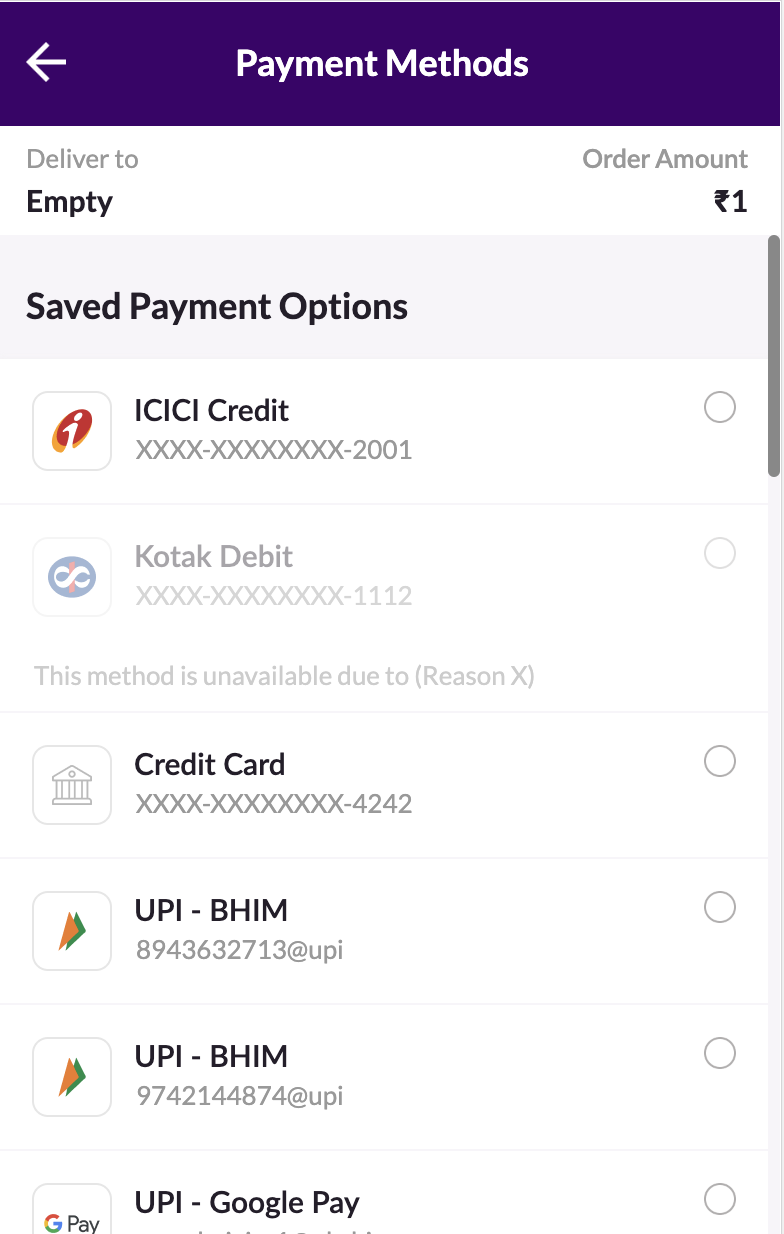
Grey Out payment methods
Need to disable some payment method for transactions, but still show them on payment page? Gray out and add a message on which the payment method is disabled right now.
enable: false, display: true, display message: “Custom message” (character 36 limit)
Structure of Payment Filter
The Schema of PaymentFilterPayload :
Payload : PaymentFilterPayload
|
Property
|
Type & Description
|
Possible Values
|
|---|---|---|
allowDefaultOptions
| Type: Maybe Boolean; Use Case: After applying payment locking, this key defines if we have to display the filtered payment method types with the default payment method types or not.
| Possible Values: true, false Default Value: true
|
options
| Type: Array PaymentMethodFilter; Use Case: Options define on which payment locking has to be applied on.
| Possible Values: Array (Payment MethodFilter)
|
PaymentMethodFilter
|
Property
|
Type & Description
|
Possible Values
|
|---|---|---|
enable
| Type: Boolean; (*Required) Use Case: This is to decide whether to disable or enable the payment method. false will disable the payment method and true will enable the payment method. For CARD/UPI as paymentMethodType it should be true if upiFilters or cardFilters are passed.
| Possible Values: true, false
|
display
| Type: Boolean; (*Optional) Use Case: This will gray-out the payment instrument and display displayMessage (if any) when the instrument is disabled using payment locking
| Possible Values: true, false
|
displayMessage
| Type: String; (*Optional) Use Case: This is to display custom message under a payment method. Will only work when display is true
| Possible Values: "Custom Message"
|
enable
| Type: Boolean; (*Required) Use Case: This is to decide whether to disable or enable the payment method. false will disable the payment method and true will enable the payment method. For CARD/UPI as paymentMethodType it should be true if upiFilters or cardFilters are passed.
| Possible Values: true, false
|
paymentMethodType
| Type: PaymentMethodType; (*Required) Use Case: This decides on which payment method type the payment locking should be applied on.
| Possible Values: “CARD”, “UPI“, “WALLET“, “NB, “CONSUMER_FINANCE“, “REWARD“, “CASH“ All the values are case sensitive
|
paymentMethods
| Type: Array String; (*Optional) Use Case: This contains the payment methods on which payment locking have to be applied It won’t be considered if paymentMethodType is UPI / CARD.
| Possible Values: [“PHONEPE”, ”PAYTM”],... In case of mandate flows (NB, WALLET, CONSUMER_FINANCE) pass additional values with prefix JP_ For example, In NB pass both ["NB_HDFC", "JP_HDFC"] In WALLET pass both["PAYTM", "JP_PAYTM"] In CONSUMER_FINANCE pass both ["ZESTMONEY", "JP_ZESTMONEY"] All the values are case sensitive
|
cardFilters
| Type: Array CardFilter; (*Optional) It won’t be considered unless paymentMethodType is CARD.
|
CardFilter
|
Property
|
Type & Description
|
Possible Values
|
|---|---|---|
cardBrands
| Type: Array String; (*Optional)
| Possible values: “VISA”, “RUPAY”,… All the values are case sensitive
|
cardBins
| Type: Array String; (*Optional)
| Possible values: [“459000::460000“]
|
cardCountries
| Type: Array String; (*Optional)
| Possible values: “INDIA”,… All the values are case sensitive
|
cardTypes
| Type: Array String; (*Optional)
| Possible values: “DEBIT”, ”CREDIT” All the values are case sensitive
|
cardSubTypes
| Type: Array String; (*Optional)
| Possible values: “BUSINESS”, ”EMPLOYEE_CARD” All the values are case sensitive
|
cardBanks
| Type: Array String; (*Optional)
| Possible values: “SBI”,”ICICI”,.... All the values are case sensitive
|
enable
| Type: Boolean
| Possible values: true, false
|
UPIFilter: collect/intent/QR
|
Property
|
Type & Description
|
Possible Values
|
|---|---|---|
upiType
| Type: UPIType
| Possible values: “COLLECT”, ”INTENT”, "QR" All the values are case sensitive
|
enable
| Type: Boolean
| Possible values: true, false
|
Sample Payload
Refer to the code snippets on the right for reference.
Structure for EMI Filter
Feature Details
Allows merchants to hide/show different types of EMI plans(standard, low cost, no cost) under both card EMIs (debit & credit) and cardless EMIs
Any particular issuer can be hidden within any of these categories (Ex. HDFC Debit card EMI plans can be specifically blocked)
Solution also supports showing only EMI Options on the Payment Page
Reach out to your Juspay POC to enable EMI filter via payment locking for your account
EmiFilter filters EMI plans on a basic level (Ex. Display only no-cost EMI)
EmiSubFilter filters specific plans (Ex. HDFC debit card EMI plans to be specifically blocked)
Structure
The Schema of EmiFilter payload :
Structure
The Schema of EmiSubFilter payload :
Payload : emiOptions
|
Property
|
Type & Description
|
Possible Values
|
|---|---|---|
standardEmi
| Type: Maybe EmiSubFilter; Use Case: Controls everything with regards to standard EMI plans
| |
lowCostEmi
| Type: Maybe EmiSubFilter; Use Case: Controls everything with regards to low cost EMI plans
| |
noCostEmi
| Type: Maybe EmiSubFilter; Use Case: Controls everything with regards to no cost EMI plans
| |
showOnlyEmi
| Type: Maybe Boolean; Use Case: EMI will be the only visible instrument on payment page
| Possible values: true, false
|
Payload : standardEmi/lowCostEmi/noCostEmi/showOnlyEmi
|
Property
|
Type & Description
|
Possible Values
|
|---|---|---|
enable
| Type: Boolean; (*Required) Use Case: This is to decide whether to disable or enable standardEMI, lowCostEMI or noCostEMI
| Possible values: true, false
|
credit
| Type: Maybe Use Case: Controls everything with regards to credit card plans within the given EMI type (standard/ low cost/ no cost)
| |
debit
| Type: Maybe Use Case: Controls everything with regards to debit card plans within the given EMI type (standard/ low cost/ no cost)
| |
cardless
| Type: Maybe Use Case: Controls everything with regards to cardless card plans within the given EMI type (standard/ low cost/ no cost)
|
Payload : credit/ debit/ cardless
|
Property
|
Type & Description
|
Possible Values
|
|---|---|---|
enable
| Type: Boolean; (*Required) Use Case: This is to decide whether to disable or enable credit, debit or cardless EMI
| Possible values: true, false
|
filters :: enable
| Type: Boolean; (*Required) Use Case: This is to decide whether to disable or enable plans
| Possible values: true, false
|
filters :: paymentMethodType
| Type: String; Use Case: EMI plans of this particular payment method type will be locked
| Possible values: “CARD”, “UPI“, “WALLET“, “NB, “CONSUMER_FINANCE“, “REWARD“, “CASH“ All the values are case sensitive
|
filters :: paymentMethod
| Type: Array String; Use Case: EMI plans of this particular payment method will be locked
| Possible values: [“PHONEPE”, ”PAYTM”],... All the values are case sensitive
|
filters :: issuerFilters
| Type: {issuers :: Array String, enable :: Boolean} Use Case: This is to decide whether to disable or enable EMI Issuers based on above filters
| Possible values: JP Bank code of the issuer. For example, JP_HDFC
|
filters :: issuerFilters
| Type: {tenures :: Array String, enable :: Boolean} Use Case: This is to decide whether to disable or enable EMI Tenures based on above filters
| Possible values: "5::6","12::20"
|