

Handle Payment Response
Step 1
Add Order Status function in your Backend
Step 2
Fetch Payment Status on Frontend
Step 3
Display Payment Status

Expose /handleJuspayResponse API endpoint on your backend that calls the orderStatus() function of PHP SDK. This API endpoint will be called from your frontend to fetch the payment status.
For ease of implementation, you can refer to orderStatus( ) function from ‘Program.php’ file
After completion of a payment session the user will be redirected to your app. You will receive process_result callback from the Frontend SDK.
After receiving process_result from Frontend SDK, call the API endpoint created in the above step from your frontend, to fetch the latest order status from bank servers (refer to sample response ). Please ensure that you verify the order ID and transaction amount.
You can refer to ‘ResponsePage' file for complete code on payment status handling. In sendGetRequest()function call, replace http://10.0.2.2:5000 with the URL of your backend.
Create the UI based on the order status response. Please refer to Transaction Status section to understand how to handle various order status scenarios.
The following figure is a workflow of how you can handle the order status:
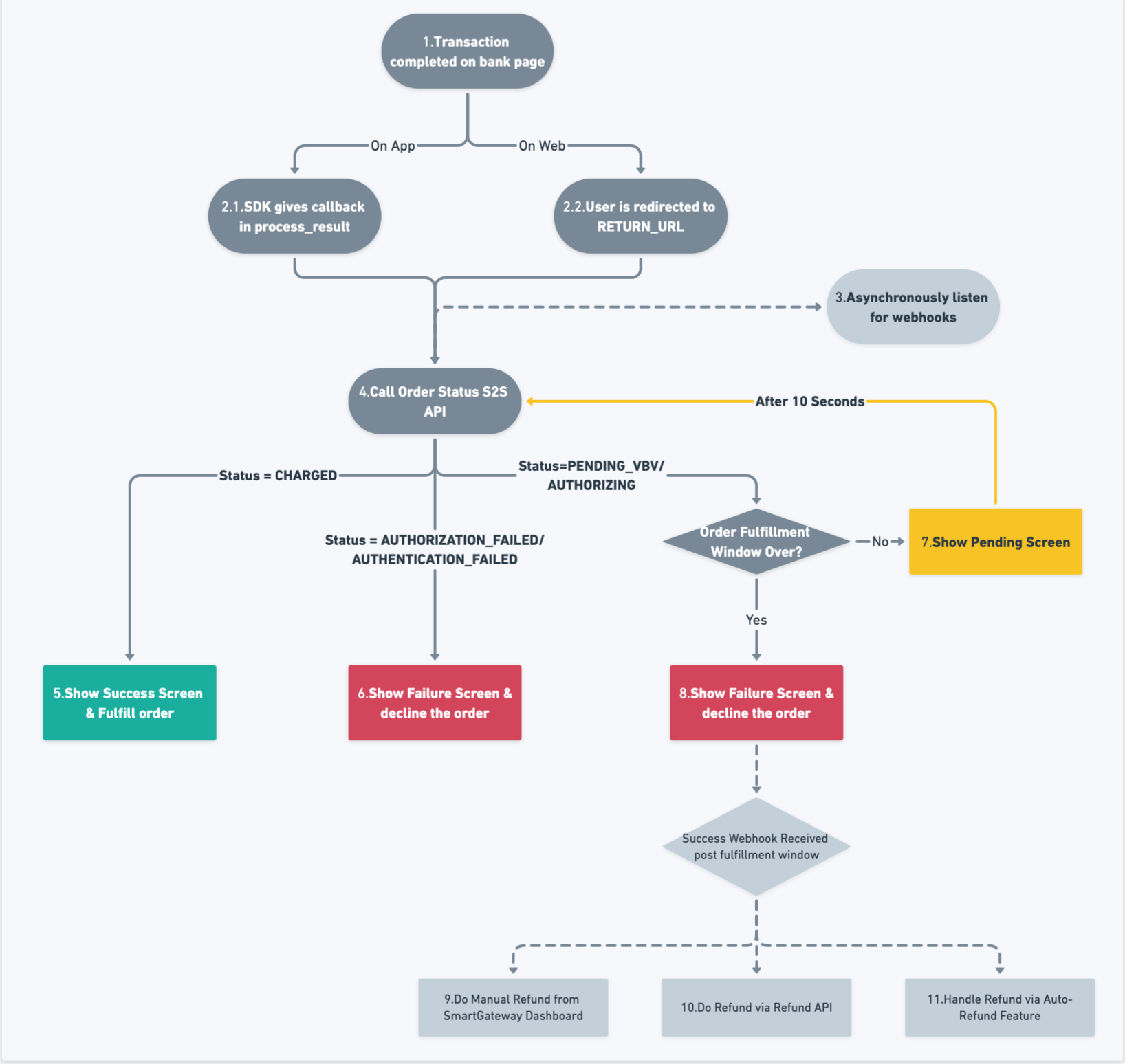
Once the payment status is determined via the API, the final status should be displayed to the user. This screen needs to be handled by the merchant, it is not provided by the Hypercheckout SDK.