


1. Mandate Registration
(Setting up a subscription)
To register a subscription, pass subscription related parameters in the Session API to open the HyperCheckout screen with the subscription supported Payment Methods. Post transaction completion, use Order Status API and Webhooks to capture mandate registration details.
Pass mandate related parameters in Session API. Make sure all the required fields for mandates are passed correctly.
Mandate related parameters to be passed
Enum: 'REQUIRED' , "OPTIONAL'.
Defines what kind mandate support is available during a session.
Chose between the follow values based upon requirements :-
REQUIRED : Mandate is must for completing transaction. Only instruments which support Mandate will be shownOPTIONAL : Mandate is a user choice for completing transaction.
This is the maximum amount which can be debited via mandate.
Please be informed that the value assigned to "mandate.max_amount" will be displayed to the user when they open any UPI apps for payment. The value assigned to "amount" field will be used to show the amount on our Hypercheckout page
Mandate end date in UNIX EPOCH timestamp (UTC timezone). Post end date, mandate will move to EXPIRED state and recurring mandate will not be allowed.
Default: will be Mandate start date + 30 years
Defines the frequency of mandate execution, how often a customer should be charged.
Data type ENUM:
ONETIME (Supported only by UPI), DAILY, WEEKLY, FORTNIGHTLY, MONTHLY, BIMONTHLY, QUARTERLY, HALFYEARLY, YEARLY, ASPRESENTED
Default: ASPRESENTED
Note:
1. Daily is not supported by Billdesk and Paytm (For cards)
2. In UPI AutoPay, ONETIME frequency, Mandate is valid only for 90 Days
When frequency is passed as WEEKLY, FORTNIGHTLY, MONTHLY, BIMONTHLY, QUARTERLY, HALFYEARLY, or YEARLY then is it required that the exact day of the period should be passed.
1-7 when frequency is WEEKLY. In weekly, serial numbers start from Monday. Monday represents 1 and Sunday represents 7.
1-16 when frequency is FORTNIGHTLY. This mandate is executed twice a month. First day of the month is represented by value '1' and ends with '15' on 15th day of the month. Then again starts with '1' for 16th of the month and ends with the last day of the month.
1-31 when frequency is MONTHLY, BIMONTHLY, QUARTERLY, HALFYEARLY, or YEARLY.
Not required when frequency is ONETIME, DAILY, ASPRESENTED.
For Razorpay, rule_value will be considered as the last date of the week/month/year. For Paytm, rule_value will be considered as today's date/day
Data type ENUM: FIXED, VARIABLE.
By default, it is considered as VARIABLE. In case of FIXED amount_rule
Set to true if funds have to be blocked while a mandate is being created. Should be true for ONETIME and false for Recurring. By default value will be TRUE for ONETIME and FALSE for Recurring.
Post the transaction is completed, it is mandatory to do a Server-to-Server Order Status API call to determine the final payment status.Please ensure that you verify the order ID and amount transaction.
In the response of the request, you will receive a Mandate block, which will contain important parameters like mandate_id and mandate_statusto know the actual status of the particular mandate.
You will receive same details in
1. Order Level Webhooks - Details about the particular order created, will contain Mandate block containing Mandate Details
2. Mandate Level Webhooks - Webhooks updating details about the Mandate Status, whenever the status will change at our end, a Mandate Level webhook will be triggered.
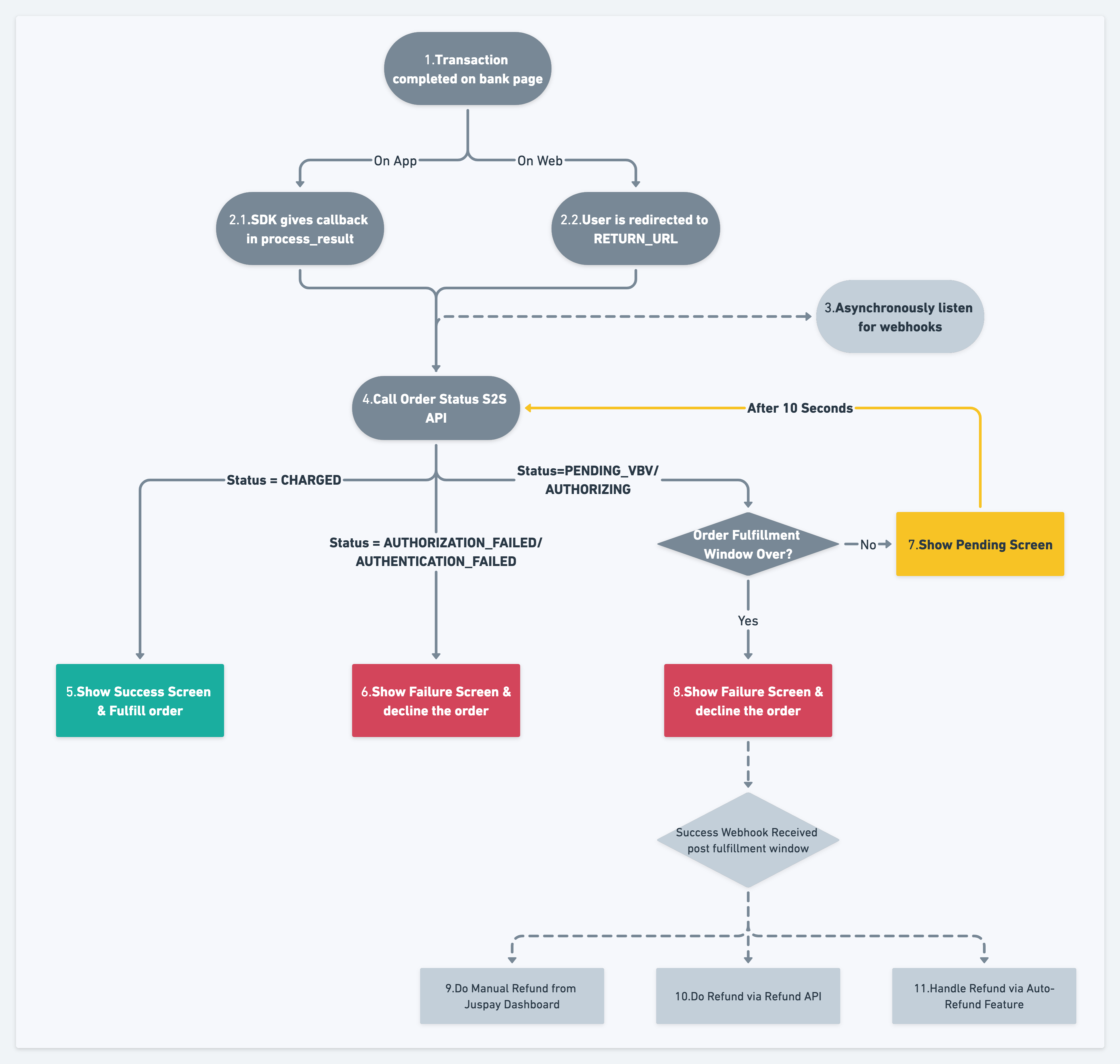
Mandate related parameters received in the order status response and webhooks
Type of the transaction. For mandate transaction below will be the enum values.
Enum values: Mandate_Register, Mandate_Payment, Emandate_Register, Emandate_Payment, TPV_Emandate_Register, TPV_Emandate_Payment
Status of the mandate.
Enum values: ACTIVE, FAILURE, REVOKE, PAUSED, CREATED
Unique ID generated by JusPay for the given mandate
Type of mandate based on the payment method.
Enum values: Mandate, EMandate