


Setting up sub-accounts
Step 1: Get support enabled for your account by your PA/PG
Reach out to the eligible PA/PG(s) to enable support for your account.
PA/PG Supported : Razorpay, PayU, Paytm_v2, Easebuzz, Gocashfree, Simpl, CCAVENUE, TPSL (Ingenico/Worldline), Yes Biz, Phonepe, DIGIO, LotusPay, Billdesk, Gocashfree, Rbl Biz
Please verify the list of payment methods supported for split settlement by PA/PG
Kindly get vendor accounts created with the gateway to use this feature.
Please find the split settlement supported payment gateways and flows as below
|
Payment Gateways
|
Split settlement supported Flows
|
On Demand Split Settlement
|
|---|---|---|
RAZORPAY
| UPI,CARD, NB, WALLET, CONSUMER FINANCE, STANDARD EMI, REFUND
| UPI,CARD, NB, WALLET, CONSUMER FINANCE, STANDARD EMI, REFUND
|
PAYU
| UPI,CARD, NB, NO COST EMI, STANDARD EMI, REFUND
| NOT SUPPORTED
|
YES_BIZ
| UPI, REFUND
| UPI, REFUND
|
RBL_BIZ
| UPI, REFUND
| NOT SUPPORTED
|
GOCASHFREE
| UPI, CARD, NB, REFUND
| UPI, CARD, NB
|
PAYTM_V2
| UPI,CARD, NB, STANDARD EMI, REFUND
| NOT SUPPORTED
|
BILLDESK
| UPI, CARD, NB, REFUND
| NOT SUPPORTED
|
DUMMY
| UPI, CARD, REFUND
| NOT SUPPORTED
|
EASEBUZZ
| UPI,CARD, NB, WALLET
| UPI,CARD, NB, WALLET
|
LOTUSPAY
| CARD
| NOT SUPPORTED
|
DIGIO
| CARD, NB
| NOT SUPPORTED
|
SIMPL
| CARD
| NOT SUPPORTED
|
TPSL
| CARD
| NOT SUPPORTED
|
PHONEPE
| CARD
| NOT SUPPORTED
|
CCAVENUE_V2
| CARD
| NOT SUPPORTED
|
Step 2: Update PA/PG set up on Juspay Dashboard
Update the configurations for selected PA/PG(s) on Juspay Dashboard to add support for Split Settlements.
Login to Juspay Dashboard > Navigate to Payments > PG Control Centre > Select gateway.
Navigate to the Split Settlement tab.
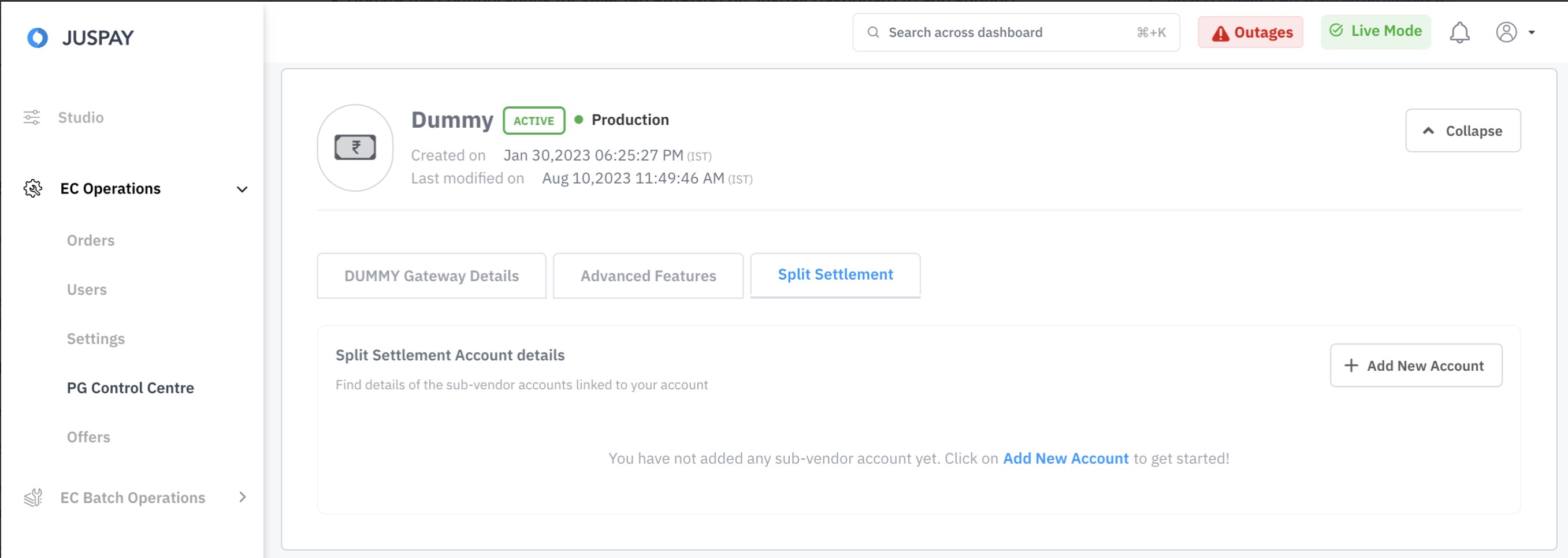
Click on Add New Account button.
Select the Add a single sub-merchant account option.
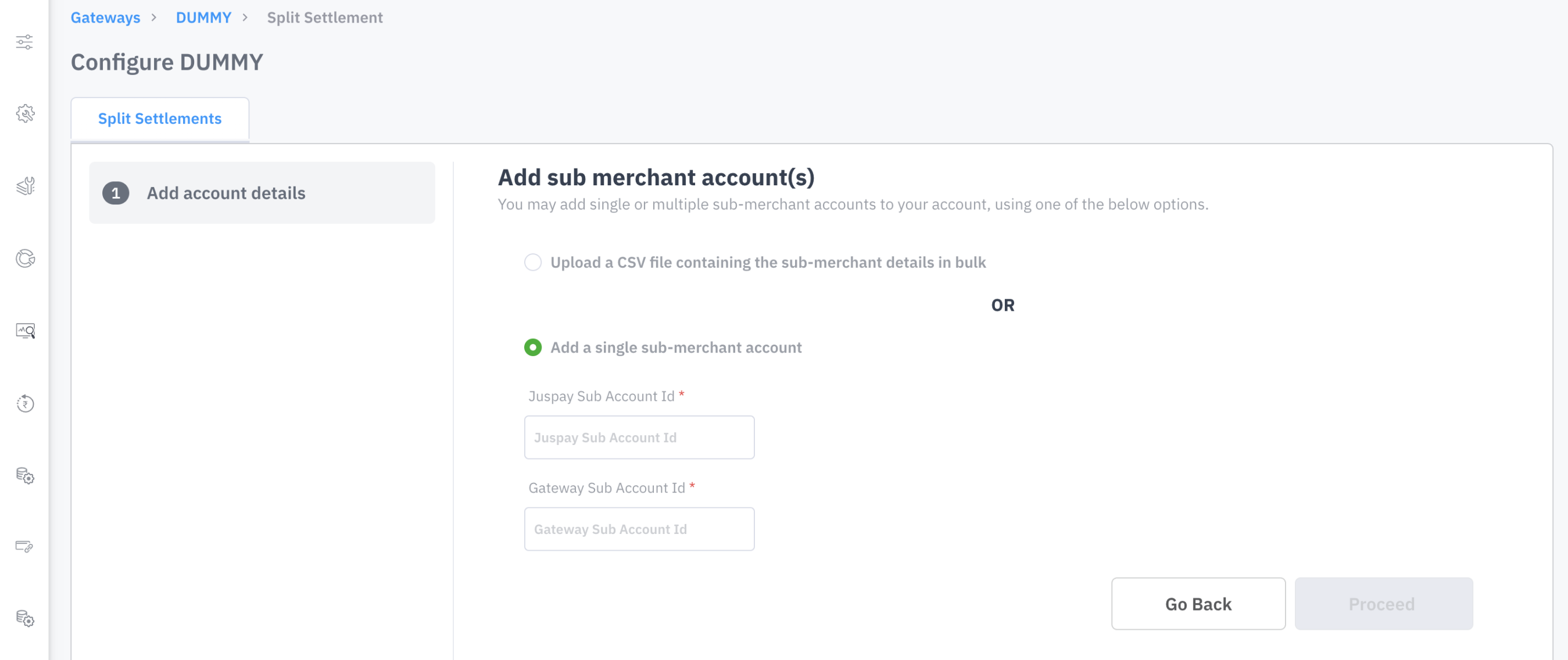
Enter the values for Juspay Sub Account Id and Gateway Sub Account Id
Juspay Sub Account Id: This unique string value is assigned by the merchant and serves as an identifier for the Vendor Account to be used during split settlements. Merchants should store and pass this identifier as the
sub_midparameter when initiating a split settlement request with Juspay.Gateway Sub Account Id: This is unique Account ID assigned by the PA/PG for the Vendor Account created on their end. Please input this Gateway Account ID as Gateway Sub Account Id so that it can be mapped to Juspay Sub Account ID.
Click on Proceed button.
The account will be configured and a success message will be displayed on the screen.
Repeat steps for all gateways/aggregators which have added support of this feature for your account.
NoteIf you have multiple vendor accounts to configure for split settlements, we offer a Batch Upload option as well. Merchants can use this feature to upload a CSV file containing the details of sub-accounts in bulk.