


Refunds
Refunds can be initiated only for transactions that are CHARGED. The refunded amount will be settled to the same payment method that the customer used for making the payment.
Initiating Refunds
There are 2 ways to initiate refunds:
Using Juspay Dashboard
Individual Order Refund (Manual Refund)
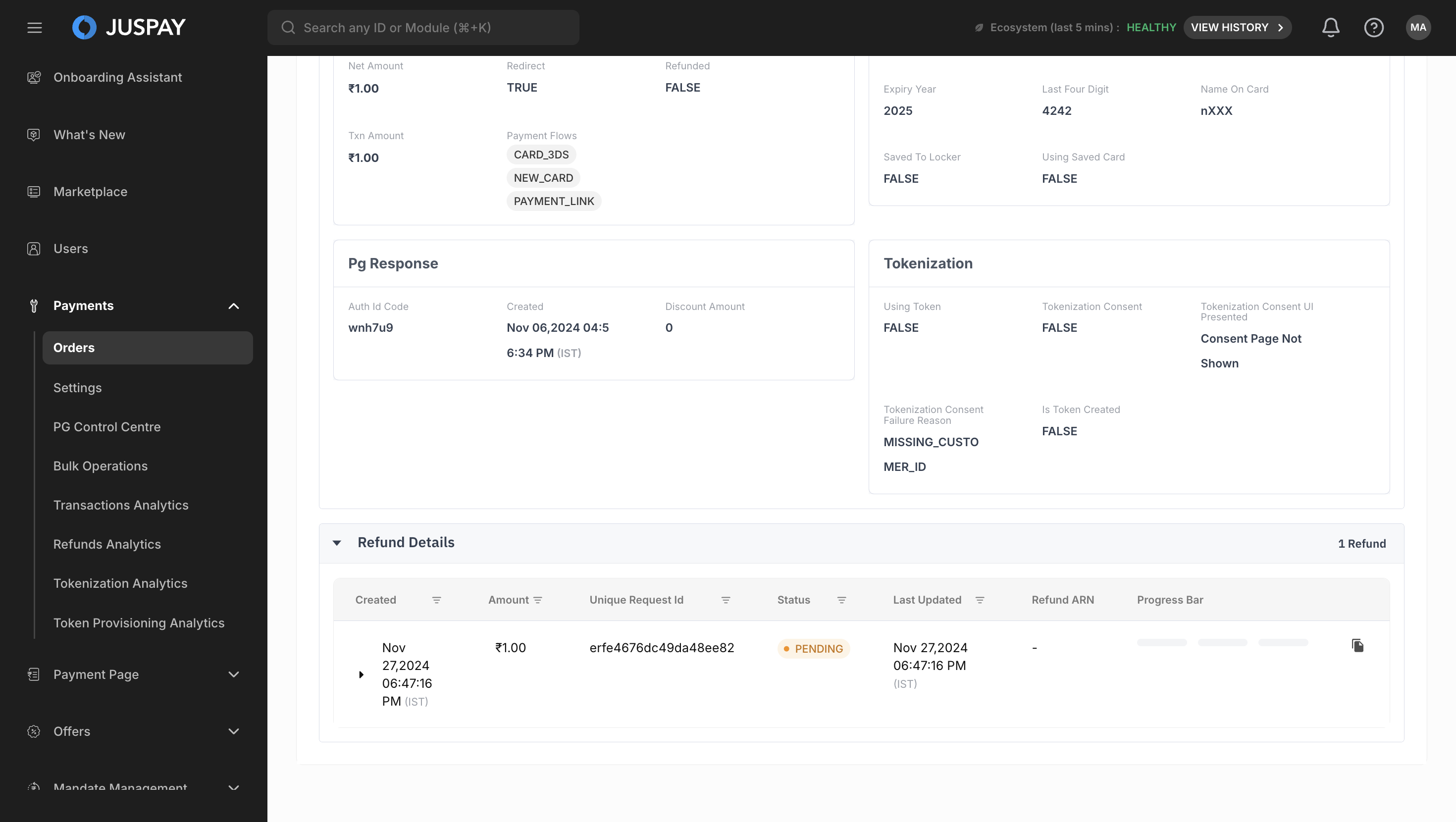
Manual refund can be created for individual transactions by following below steps:
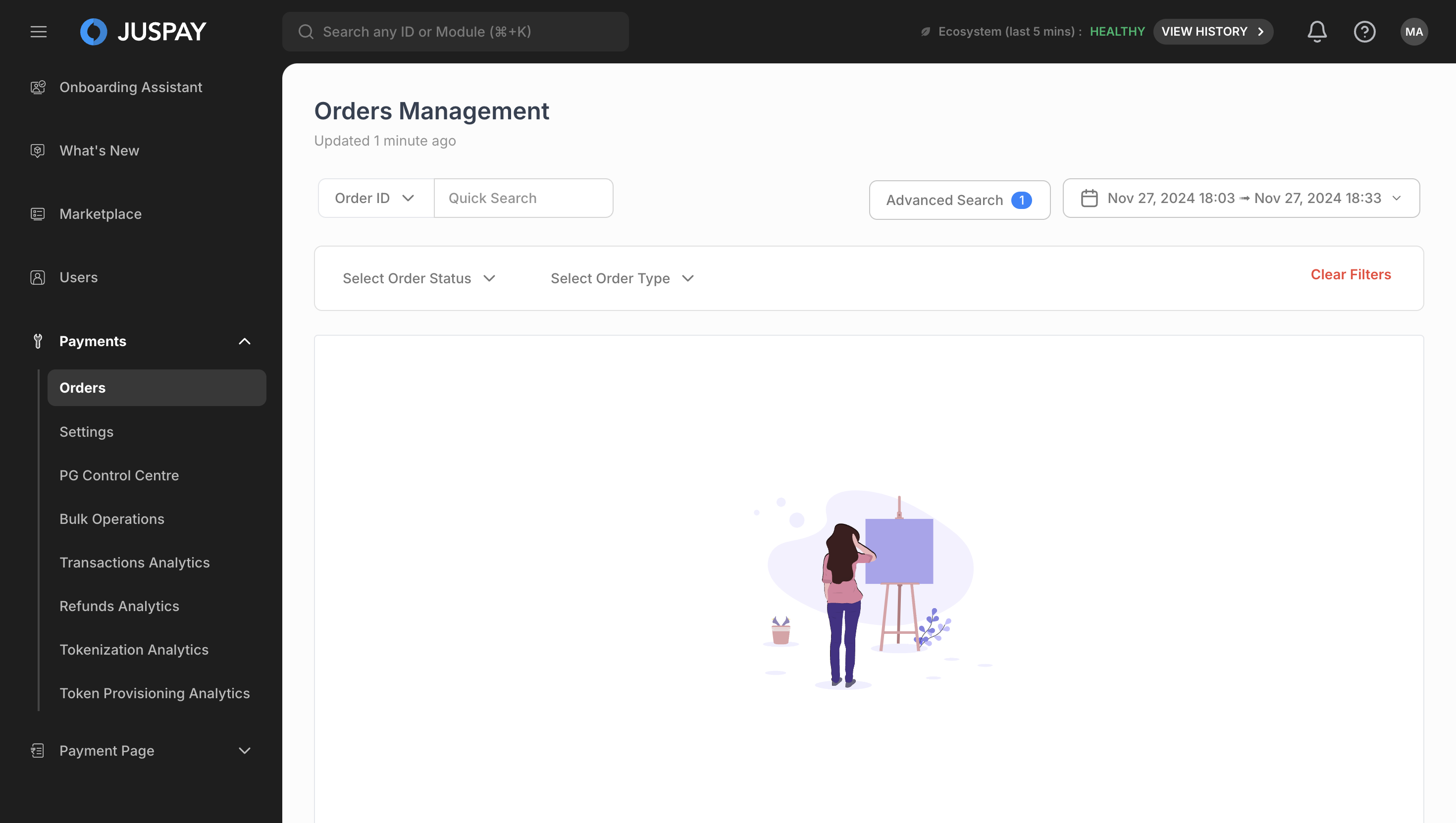
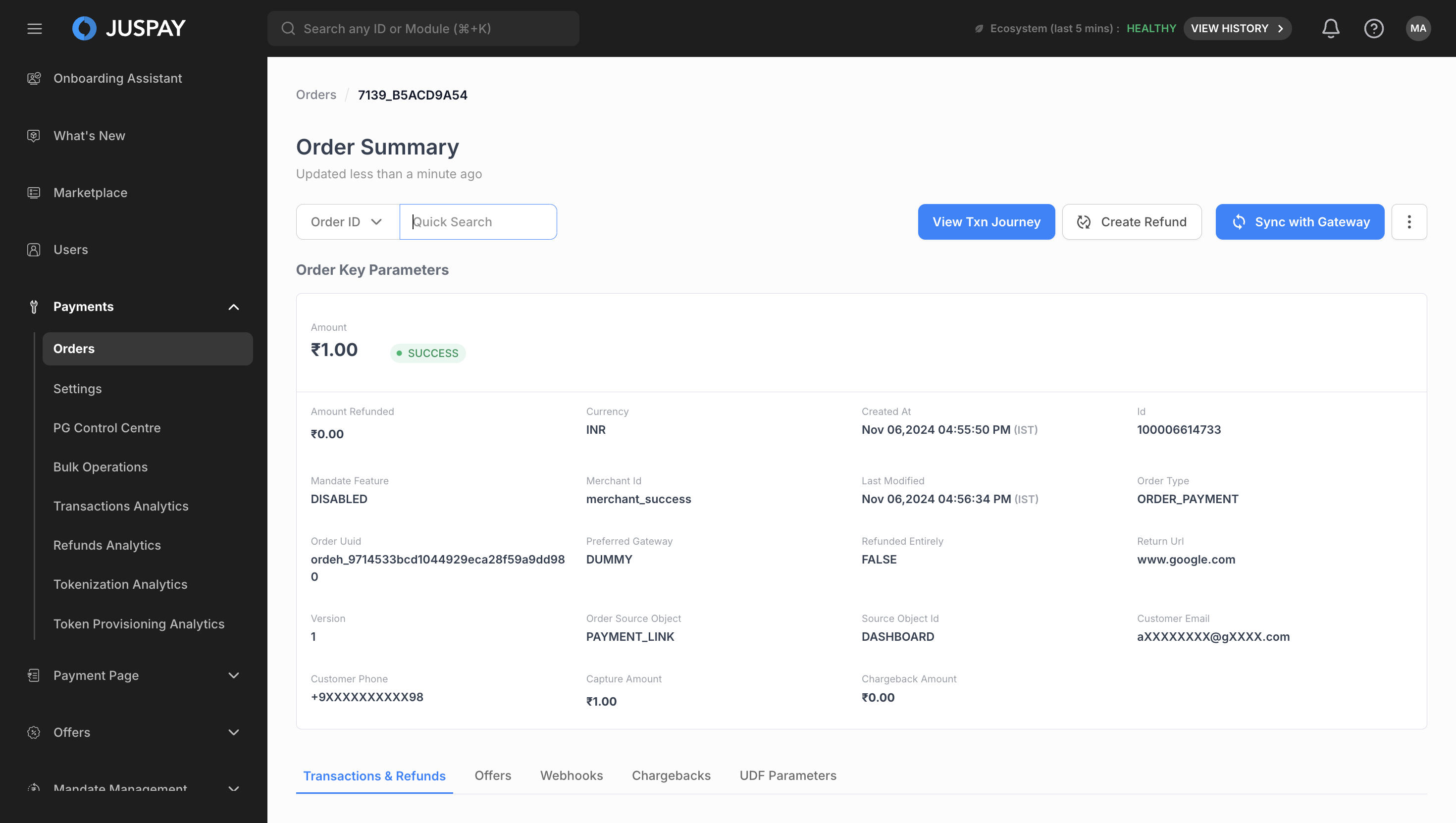
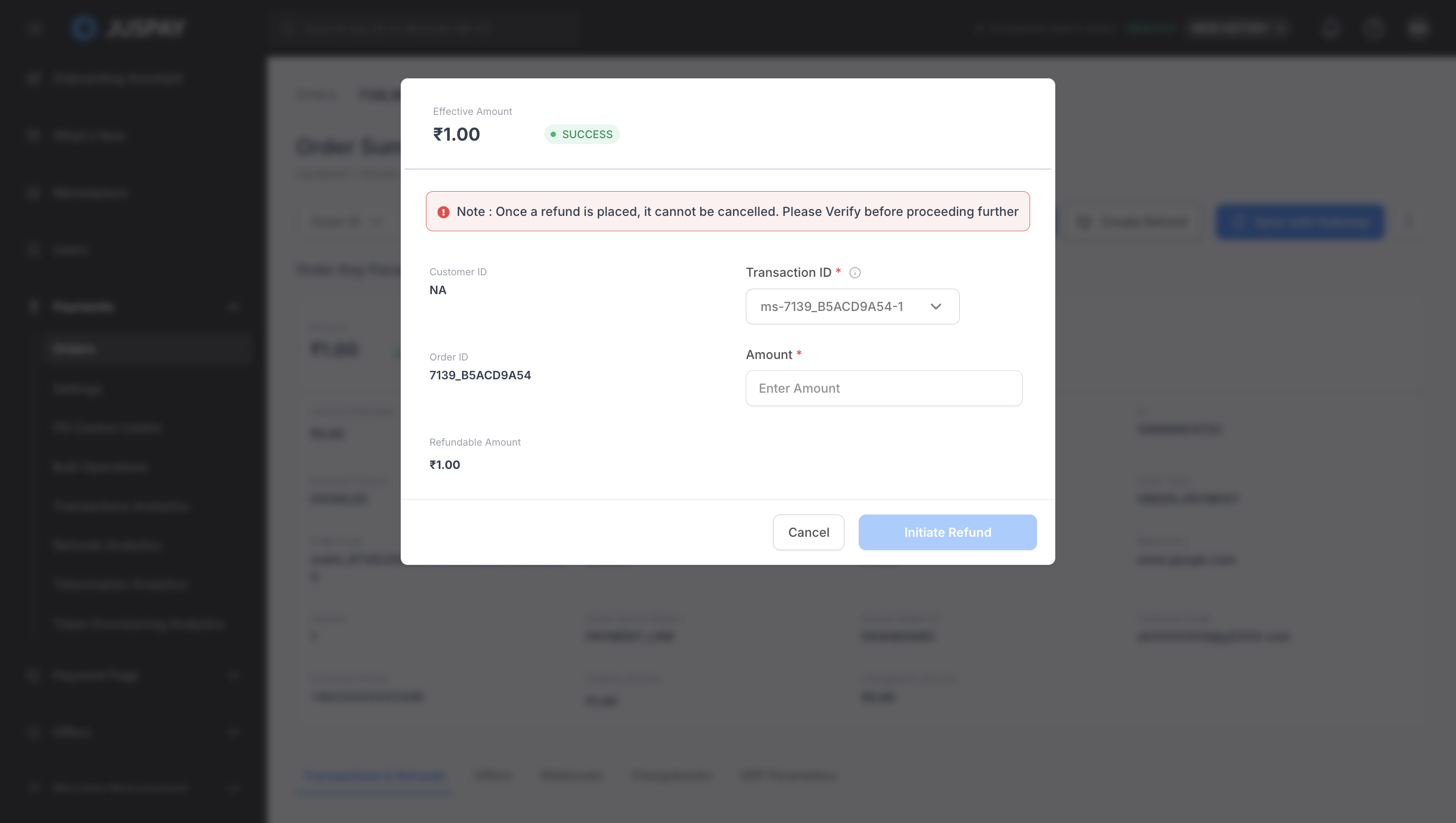
Batch Refund
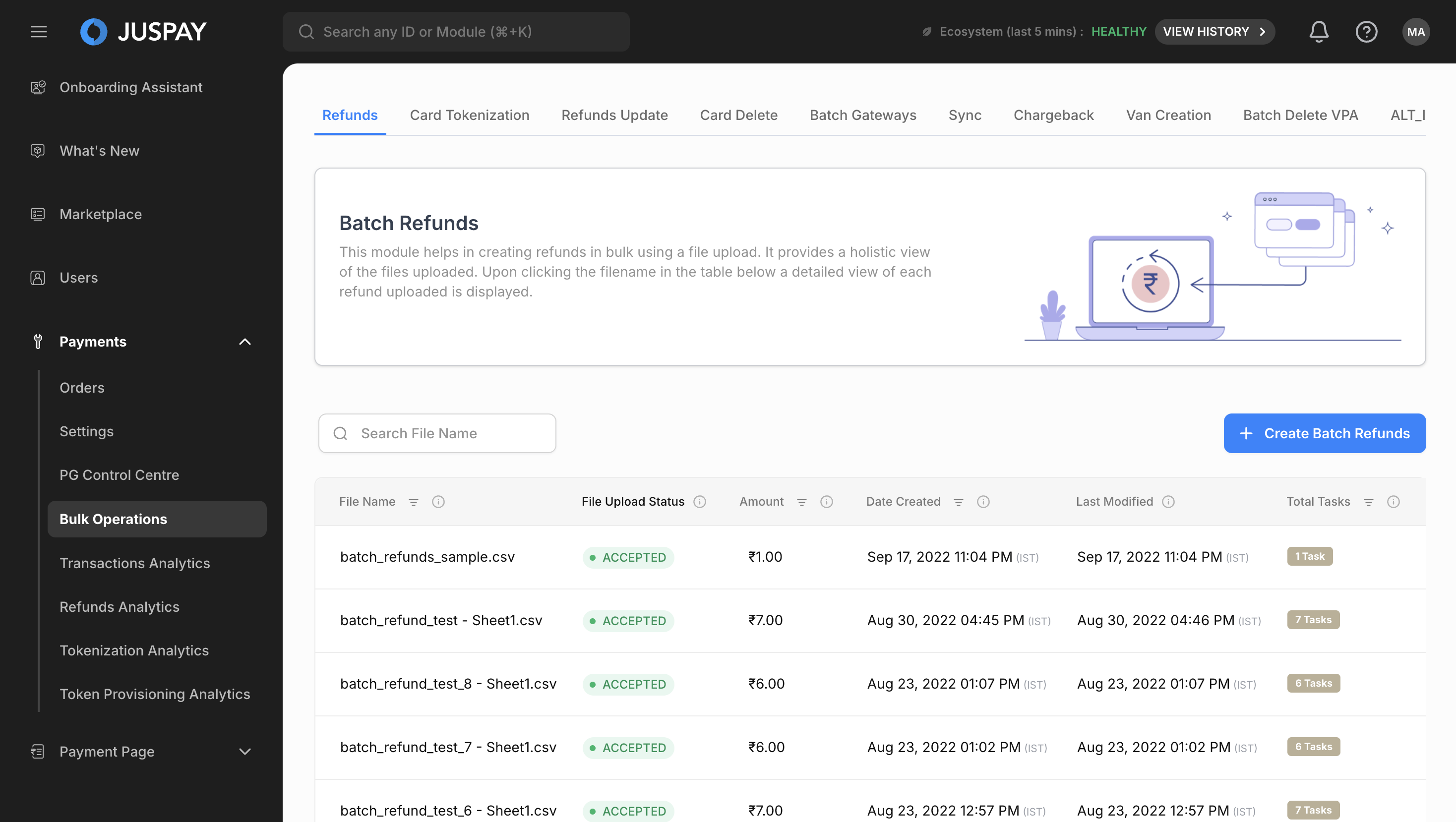
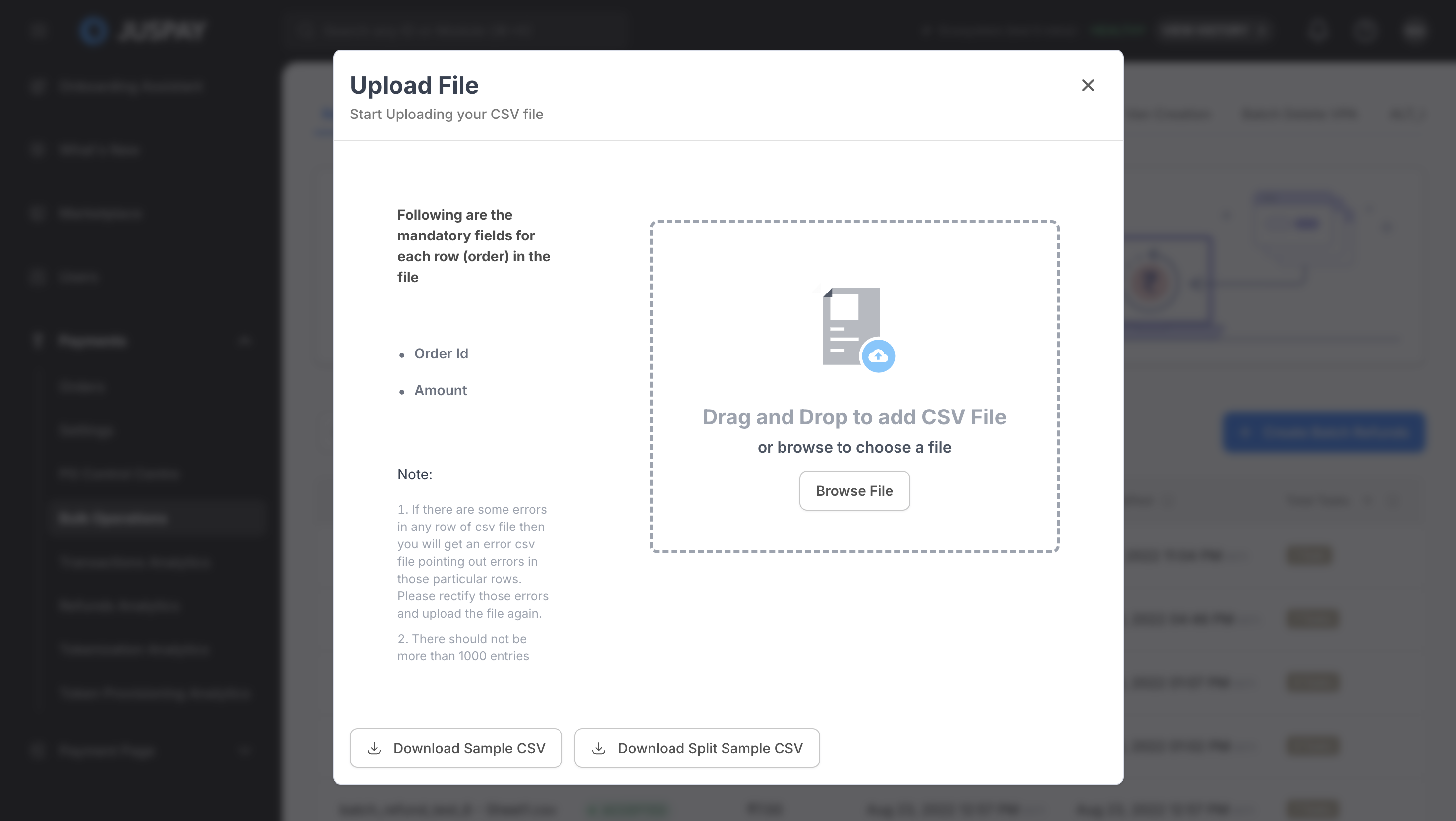
Users can mark multiple refunds by uploading a single file by selecting Batch Refund in Juspay Dashboard. Follow steps mentioned below:
Refund Status
|
Refund Status
|
Description
|
|---|---|
PENDING
| Juspay has marked refund and sent a refund request to underlying PG. Refunds are always queued before being sent to the processing system. Hence, the initial status is always PENDING. Refunds take a maximum of 7 working days to be settled to the customer. Delay is specific to the payment method used by the customer.
|
SUCCESS
| Refund has been successfully executed by underlying PG.
|
FAILURE
| Refund has failed, you will have to re-initiate refund again for the same Order.
|
MANUAL_REVIEW
| Refunds that are pending for more than 10 days goes into manual review. In this case you need to check the refund status at underlying PG and re-initiate the refund if it has failed at PG's end.
|
You can schedule the failure/manual_review report from our dashboard. Refer Reports  Section to know in detail.
Updating Refund Status
Order Status API: You need to poll this API and fetch refund details from the refunds block in the API response. Refer Order Status API
Section to know in detail.Webhook: Consume
ORDER_REFUNDED,ORDER_REFUND_FAILEDandREFUND_MANUAL_REVIEW_NEEDEDwebhooks to update the refund status real time. Refer Transaction Status Section to know in detail.
Auto Refund
In payment ecosystem when a transaction traverses from your website to payment gateway and to bank page there are possibilities that customer might get charged for a transaction, however the transaction status might not get updated in realtime due delayed response from the payment provider or the bank's digital infrastructure that is supporting the transaction.
These transactions will stay in pending state and move to success once the PG gets response from the processing bank or when the PG complete the reconciliation with the processing bank, this causes delayed success of transaction.
Your business policy might have a predefined order timeouts (a specified duration post which payments will not be accepted against the order). This may range from few minutes to a few days depending on the type of product/ service offered by your business
Supported Auto Refund Scenarios
Auto refunds can be configured to trigger automatically for the following cases:
1. Conflicted transaction
For merchants rendering realtime services, they can set a threshold time as per their order fulfilment window on Juspay dashboard. If transaction goes into pending state and we receive success response from PG post the threshold time limit set by you, then we consider that transaction as conflicted transaction.
Here the order fulfilment window means a specified duration in which payments will be accepted against an order.
The auto refund of conflicted transactions threshold time will be calculated from the time of transaction initiation and not order creation.
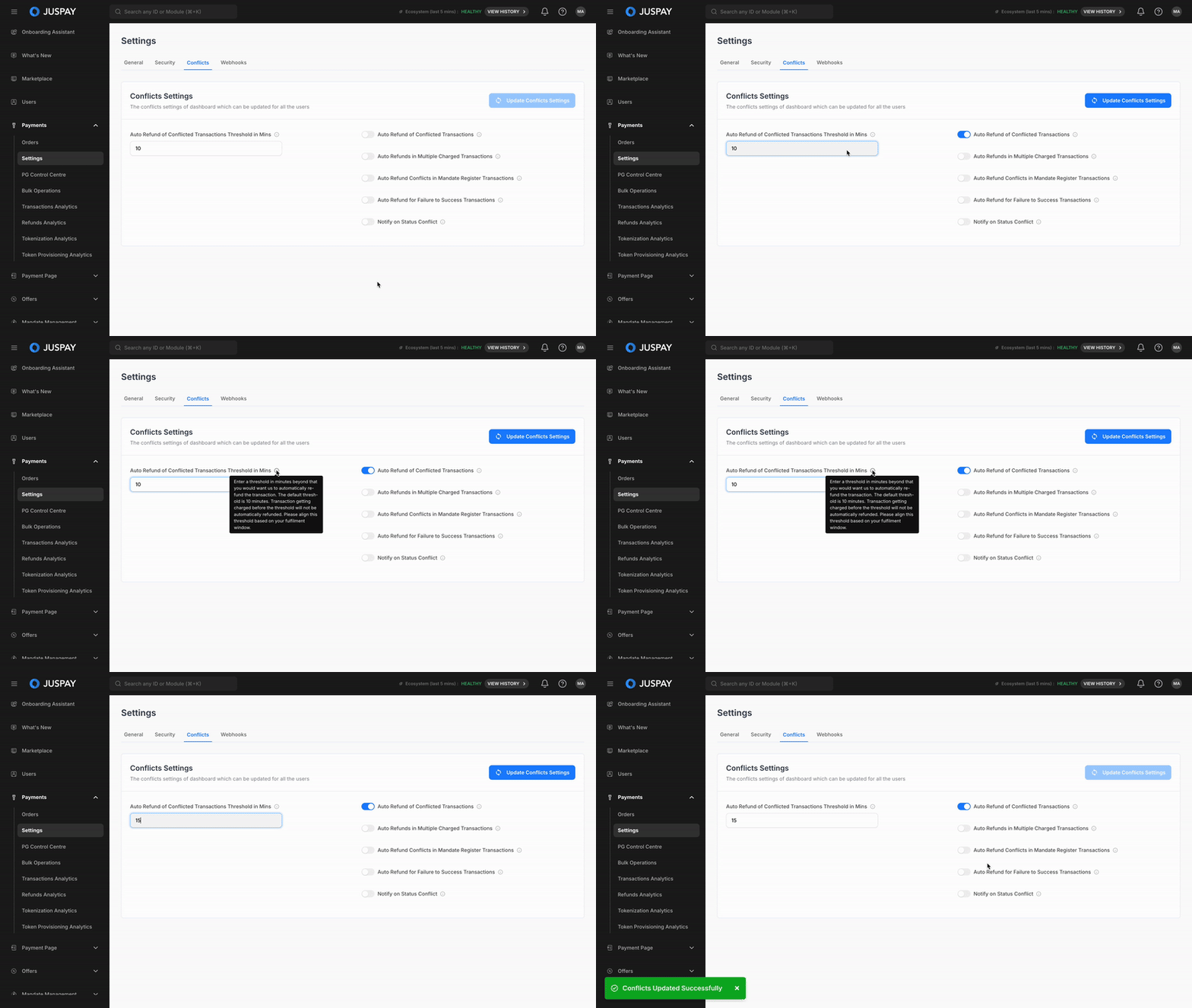
Steps to enable Auto Refunds for Conflicted transactions -
Go to your Juspay Dashboard
→ Payments → Settings → Conflict → Enable the toggle of Auto refund of Conflicted transactions.Set the Auto Refund of Conflicted Transactions Threshold in Mins (This is the field where you need to put the time limit after that when we will receive SUCCESS then that will be auto_refunded, by default it is 10 mins)
(Optional) You can also Enable the toggle of Notify on status conflict and if this is enabled then the you needs to put email id under Conflict Status Email field.
2. Multiple Charged transactions
Multiple charged transactions are those in which two or more transactions got charged against a same order. When customer attempts multiple transactions against an order ID where for the first transaction the amount is debited from customer’s account however transaction goes into pending state, customer attempts another transaction which gets successful and later the first transaction also gets successful, leading to more than one successful transaction against an Order ID.
If auto-refund for multiple charged transactions is enabled then expect for the first successful transaction all other transactions would be refunded against an Order.
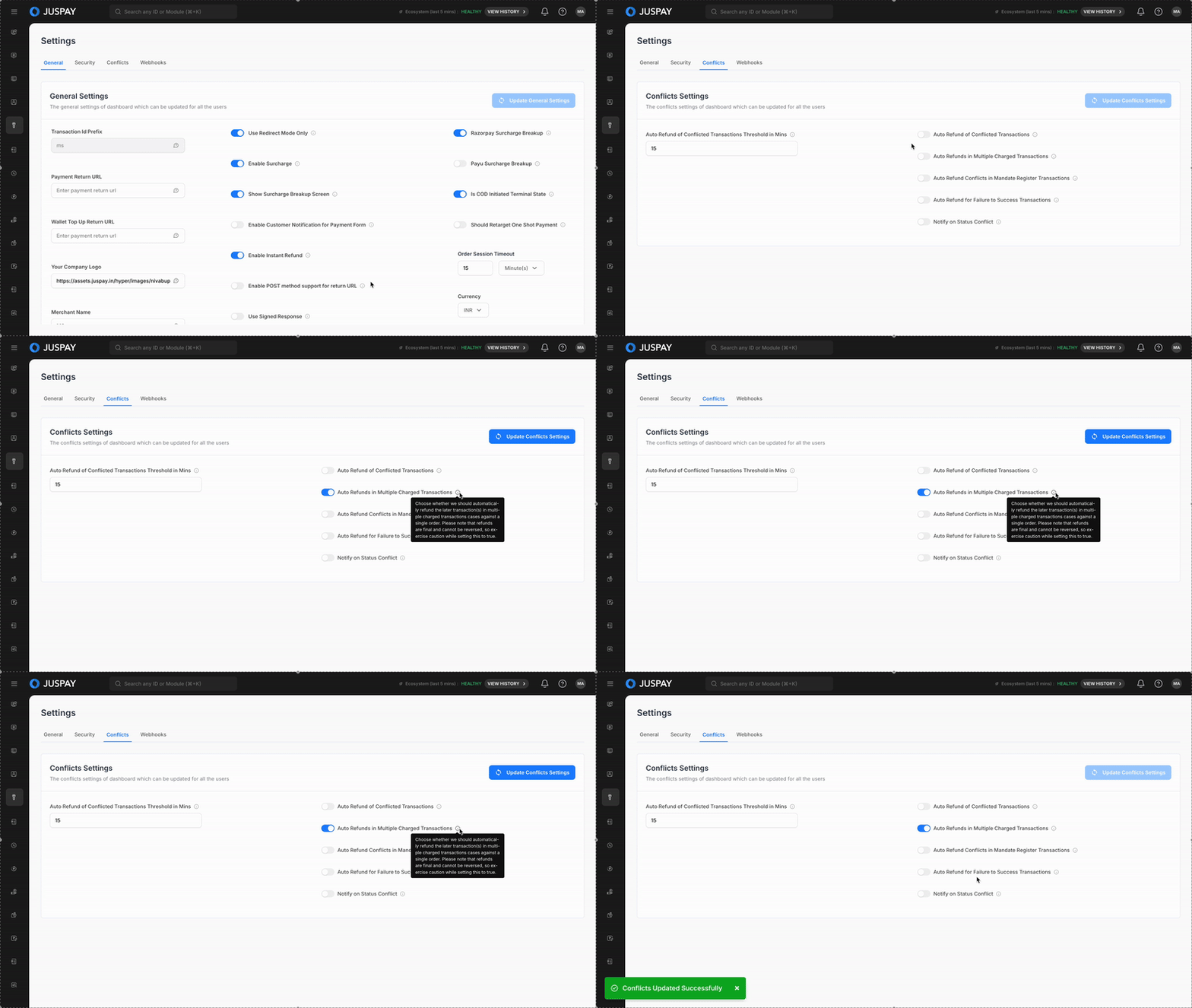
Steps to enable Auto Refunds for Multiple Charged transactions -
Go to your Juspay Dashboard → Payments → Settings → Conflict → Enable the toggle of Multiple charged Transactions.
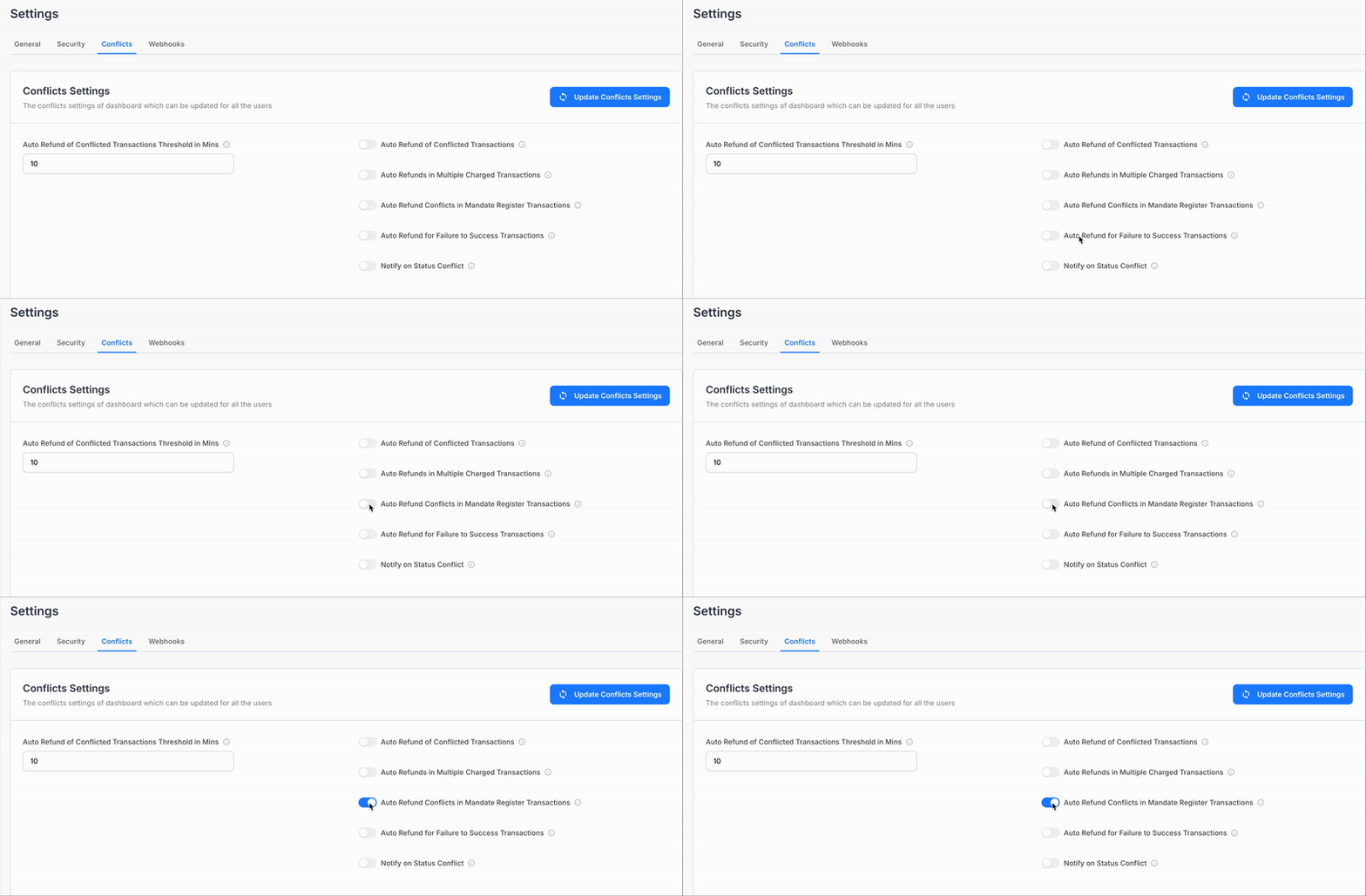
3. Mandate Register Transactions
Mandate register transactions involve conflicts where multiple transactions are charged during the mandate registration process. An auto refund can be triggered for these conflicted transactions.
Steps to Enable Auto Refunds for Mandate Register Transactions:
Go to your Juspay Dashboard → Payments → Settings → Conflict.
Enable the toggle for Auto Refund of Mandate Register Transactions.
4. Failure to Success Transactions (New)
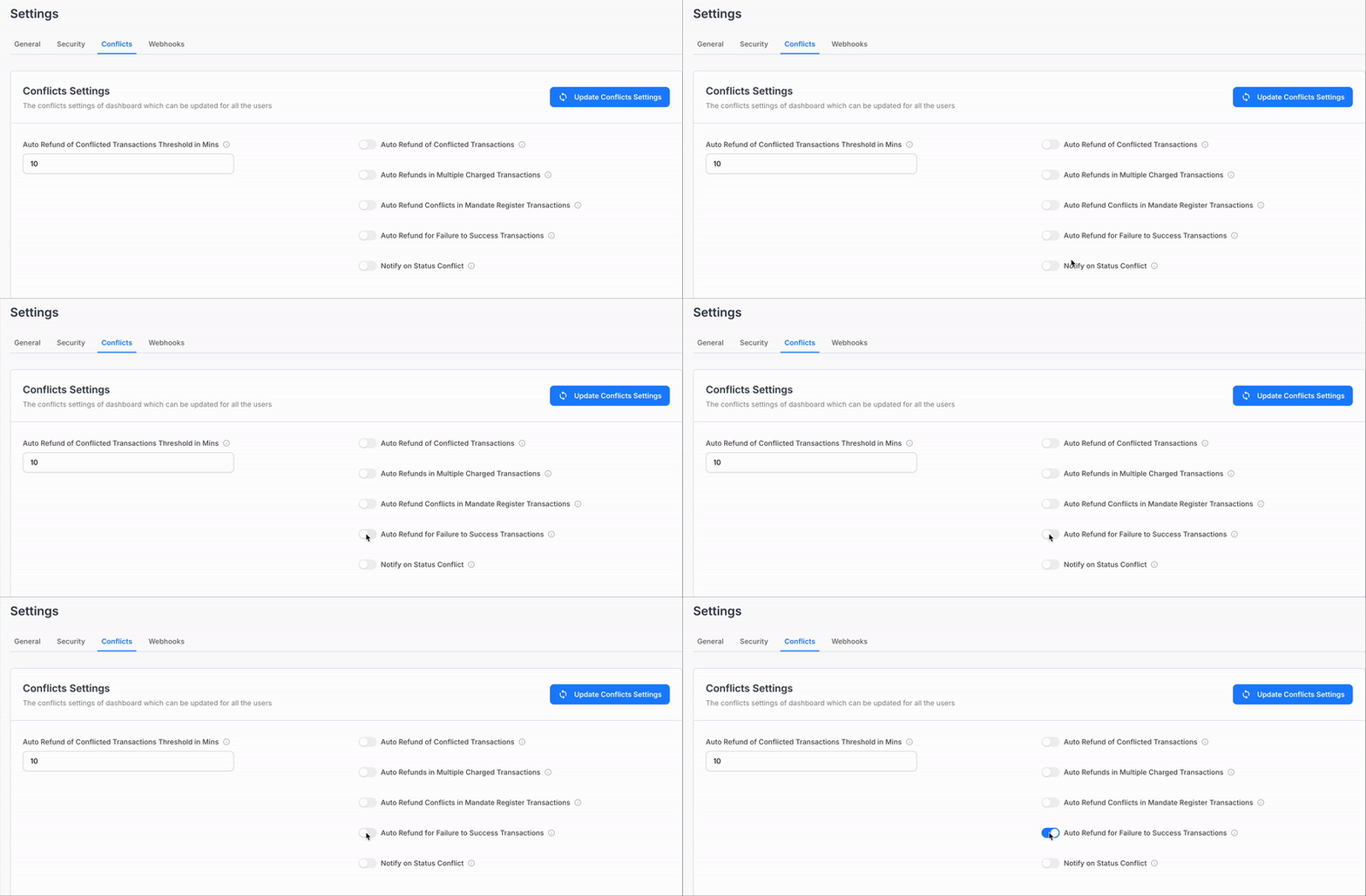
This feature allows you to automatically refund transactions that transition from Failure to
Success. It helps manage cases where transactions move from Failure to Success within a
specified fulfillment window. Merchants can allow customers to retry the transaction confidently, and Juspay will automatically issue a refund if the transaction later succeeds.
Key Advantages:
No Need for Status Checks: You no longer need to manually check the status of
transactions. Juspay will handle the status updates and automatically process refunds
for transactions that fail but later succeed within your fulfilment window.Confident Retries: This feature enables customers to retry transactions instantly without
worrying about previous failures. This helps reduce drop-offs and increases satisfaction.
Steps to Enable Auto Refunds for Failure to Success Transactions:
Go to your Juspay Dashboard → Payments → Settings → Conflict.
Enable the toggle for Auto Refund of Failure to Success Transactions.
Configure the Fulfilment Window to define the time period during which the transaction
can move from failure to success before triggering the auto-refund.
5. Notify on Status Conflict
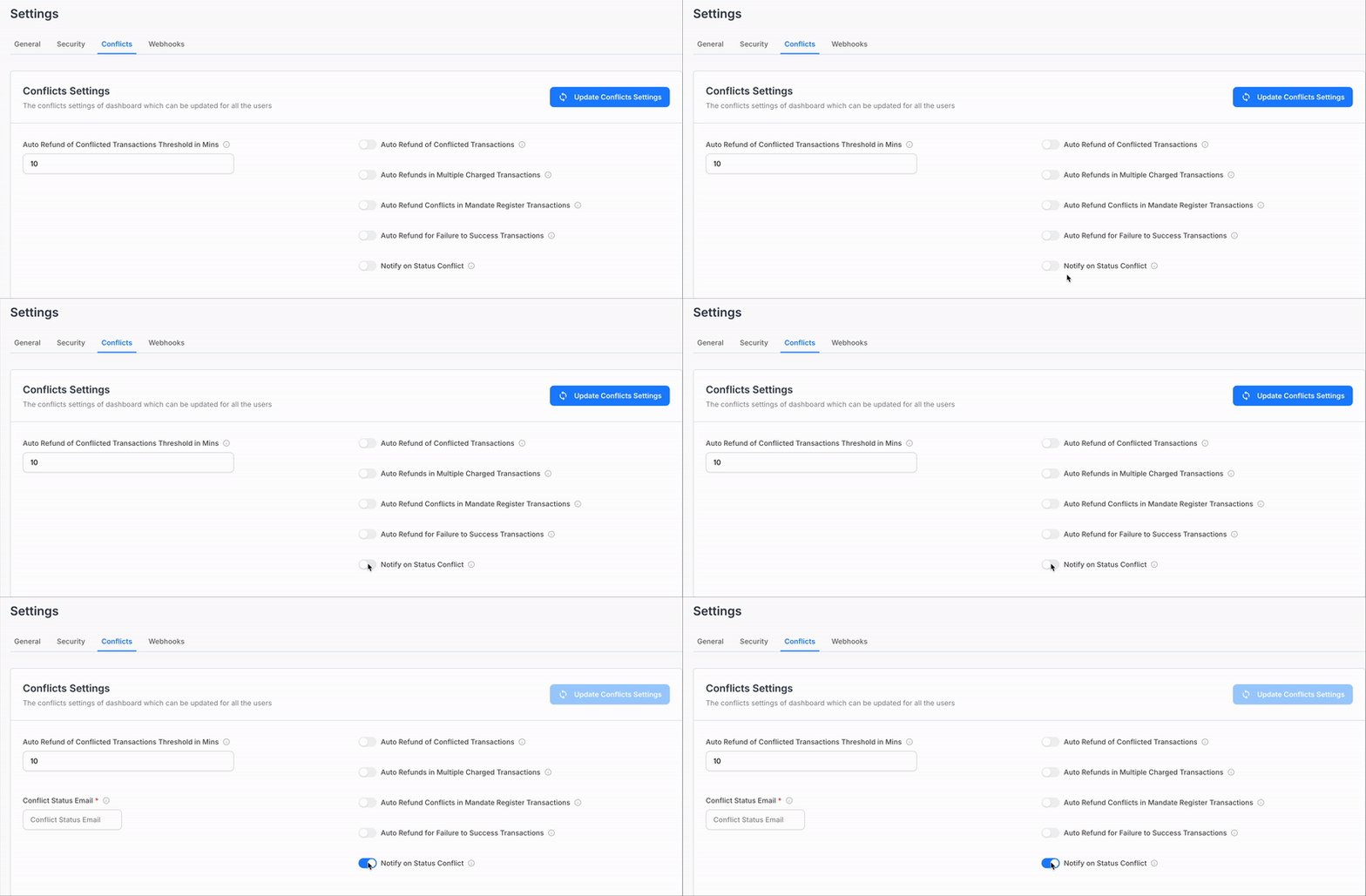
This feature notifies you whenever a conflict occurs between the transaction status in Juspay’s system and the underlying payment gateway.
Steps to Enable Notify on Status Conflict:
Go to your Juspay Dashboard → Payments → Settings → Conflict.
Enable the toggle for Notify on Status Conflict.
Provide an email ID in the Conflict Status Email field to receive notifications.
Auto refunds are transaction level refunds in which all transactions which breach the auto refund threshold would be auto refunded.
Refunds are final and cannot be reversed. Exercise caution when enabling this feature.
It is recommended to enable auto refund webhooks from the Juspay dashboard.
You should be able capture the order status as AUTO_REFUNDED at your end.
The Auto Refund of Conflicted Transactions Threshold time will be calculated from the time of transaction initiation not order creation.
The default fulfilment window for Auto Refunds is 10 minutes. This is the time limit after which a late success will be auto-refunded.
Updating Refund Status for Auto-refunded transaction
Order Status API: You need to poll this API and fetch refund details from the refunds block in the API response, the order status of auto-refunded transaction would be AUTO_REFUNDED. Refer Order Status API
Section to know in detail.ErrorPlease make sure to pass version greater than "2019-11-11" while making order status call else you will not received Order Status as AUTO_REFUNDED.
Webhook: Please consume the below webhooks to update the refund status for auto refunded transaction.
AUTO_REFUND_INITIATED: Generated when a transaction an auto refund entry for that transaction is created at Juspay.
AUTO_REFUND_SUCCEEDED: Generated when the transaction is auto refunded and refund is success.
AUTO_REFUND_FAILED: Generated when the transaction is auto refunded and refund has failed.NoteIf auto-refund fails, Juspay automatically re-initiates the refund with underlying PG for 4 more times (total 5 refund attempts).