

4. Handle Payment Response
Step 4.1.
Handle Payment Events from SDK
Step 4.2.
Check Payment Status
Step 4.3.
Consume Webhoks
Step 4.4.
Display Payment Status

All payment responses are sent by the SDK in the hyperSDKCallback under the process_result event.
Implement the highlighted code snippet in your app for proper handling of all events and status
After receiving process_result from SDK, it is mandatory to do a Server-to-Server Order Status API call to determine the final payment status. Please ensure that you verify the order ID and amount transaction.
To understand how to handle payment status, refer to this section
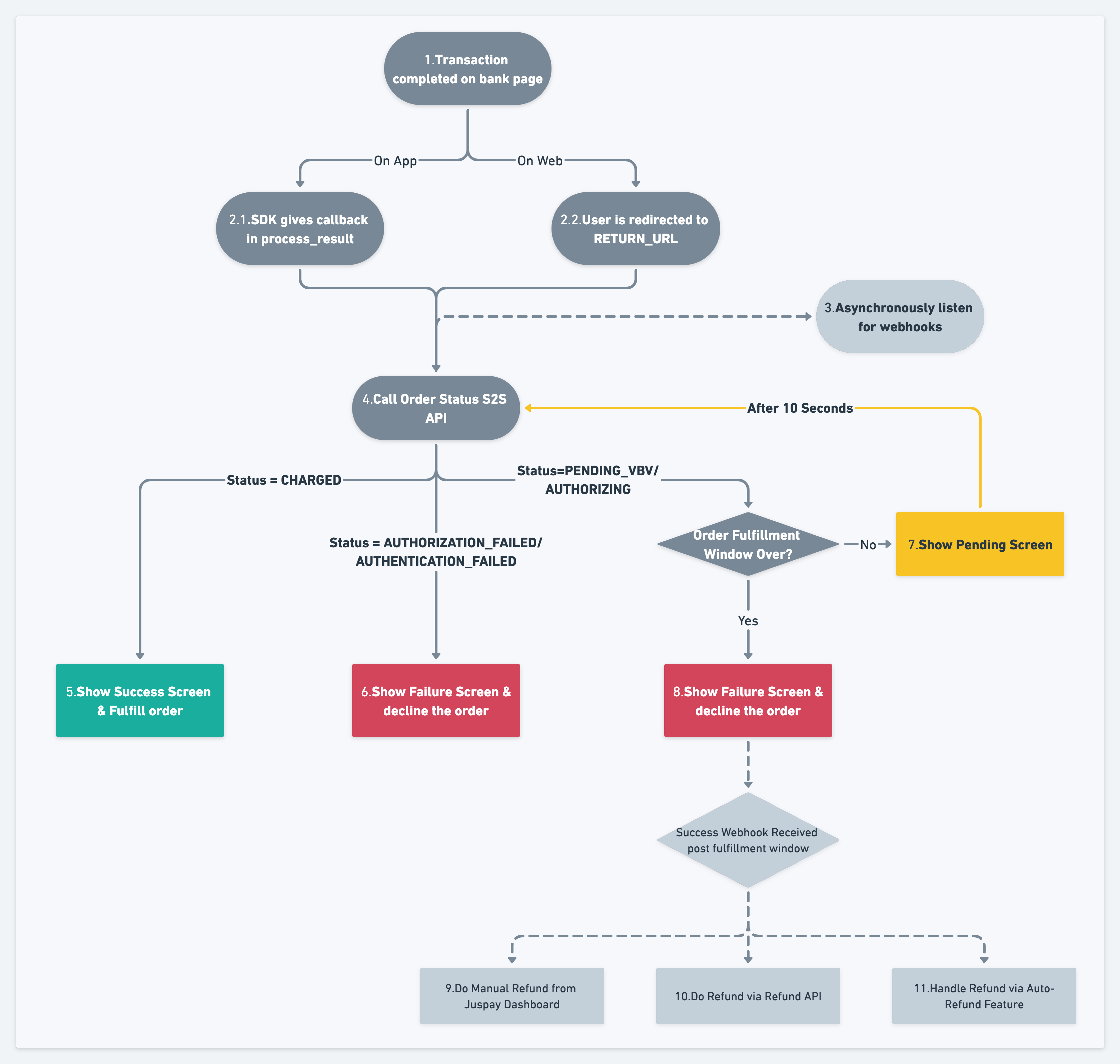
After the completion of every payment/refund, Juspay will provide direct notification to your server regarding the event. These are called Webhooks. You must configure a valid HTTPS endpoint that is reachable from our servers to consume these notifications. Our servers will push data using HTTP POST calls to your endpoint. Click for Detailed Webhook Specifications
Once the payment status is determined via the API, the final status should be displayed to the user. This screen needs to be handled by the merchant, it is not provided by the SDK