


Standard EMI Suite
Feature specifications
PA/PGs support EMI plans from a selected set of issuers
Merchants can source EMI plans from respective PA/PGs or directly from Banks/NBFCs
Your PA/PG needs to enable EMI support for your account for Juspay EMI feature to work
Please find below the list of PA/PGs that support Credit Card EMI plans.
Scroll inside to view moreBank nameEMI Tenure (months)Supported GatewaysHDFC Bank3, 6, 9, 12, 18, 24, 36Razorpay, PayU, Pinelabs, Paytm_V2, Gocashfree, Billdesk, EasebuzzCITI Bank3, 6, 9, 12, 18, 24Razorpay, PayU, Pinelabs, Paytm_V2, Gocashfree, Billdesk, EasebuzzICICI Bank3, 6, 9, 12, 18, 24Razorpay, PayU, Pinelabs, Paytm_V2, Gocashfree, Billdesk, Easebuzz, CCAvenueState Bank of India3, 6, 9, 12Razorpay, PayU, Pinelabs, Paytm_V2, Gocashfree, Billdesk, CCAvenue, EasebuzzAXIS Bank3, 6, 9, 12, 18, 24Razorpay, PayU, Pinelabs, Paytm_V2, Gocashfree, Billdesk, CCAvenue, EasebuzzStandard Chartered Bank3, 6, 9, 12, 18, 24Razorpay, PayU, Pinelabs, Paytm_V2, Gocashfree, Billdesk, EasebuzzKotak Bank3, 6, 9, 12, 18, 24Razorpay, PayU, Pinelabs, Paytm_V2, Gocashfree, Billdesk, CCAvenue, EasebuzzHSBC Bank3,6,9,12,18,24Razorpay, PayU, Pinelabs, Paytm_V2, Gocashfree, Billdesk, CCAvenueBank Of Baroda3,6,9,12,18,24Razorpay, PayU, Pinelabs, Paytm_V2, Gocashfree, BilldeskAU Small Finance Bank3,6,9,12,18,24PayU, Paytm_V2, Gocashfree,AMEX3,6,9,12Razorpay, PayU, Pinelabs, Paytm_V2, Gocashfree, Billdesk, CCAvenueIndusInd Bank3,6,9,12,18,24Razorpay, PayU, Pinelabs, Paytm_V2, Gocashfree, Billdesk, CCAvenueIDFC Bank3,6,9,12,15,18,24,36PayU, Paytm_V2, BilldeskJ&K Bank3,6,9,12BilldeskOneCard3,6,9,12,18,24Razorpay, PayU, Pinelabs, Paytm_V2IDBI Bank3,6,9,12PayU, Paytm_V2, BilldeskFederal Bank3,6,9,12,18,24Razorpay, GocashfreeRBL Bank3,6,9,12,18,24Razorpay, PayU, Pinelabs, Paytm_V2, Gocashfree, BilldeskYES Bank3,6,9,12,18,24Razorpay, PayU, Pinelabs, Paytm_V2, Gocashfree, BilldeskPlease find below the list of PA/PGs that support Debit Card EMI plans.
Scroll inside to view moreBank nameEMI Tenure (months)Supported GatewaysState Bank of India6, 9, 12, 18PayU, BilldeskKotak Bank1, 2, 3, 6, 9, 12Razorpay, PayU, PinelabsFederal Bank3, 6, 9, 12PayUBank Of Baroda3, 6, 9, 12, 18Razorpay, PayUICICI Bank3, 6, 9, 12PayU, Pinelabs, Paytm_V2AXIS Bank3, 6, 9, 12, 18, 24PayU, PinelabsHDFC Bank3, 6, 9, 12, 18Razorpay, PayU, Pinelabs, Paytm_V2, BilldeskBAJAJFINSERV3, 6, 9, 12Razorpay, PayU, BajajFinserv
Please find below the list of PA/PGs that support Cardless EMI plans.
Scroll inside to view moreBank nameEMI Tenure (months)Supported GatewaysKotak Bank3, 6, 9, 12, 18, 24, 36Easebuzz, ShopSeICICI Bank3, 6, 9, 12, 18, 24, 36Easebuzz, ShopSeHDFC Bank3, 6, 9, 12, 18, 24, 36Easebuzz, ShopSePlease find below the list of PA/PGs that support Other EMI plans.
EMI Plan Configuration
With varied level of Integration, Juspay offers three different ways in which you can configure EMI plans on Juspay Dashboard for a selected PA/PG:
Juspay <> Pinelabs
With deep integration capabilities, Juspay fetches EMI plans in real time from PineLabs for a given account
Hence, you are not required to configure EMI plans in advance on Juspay Dashboard
EMI plans will be rendered on the payment page in real time by Juspay if you are using Juspay Hypercheckout (Payment Page) or the updated list of EMI plan will be shared with you through API if you are using Juspay ExpressCheckout SDK or Juspay ExpressCheckout APIs.
Juspay <> PayU, Razorpay, CCAvenueV2
Juspay is integrated with these PGs with capabilities to sync as and when required to get account details
Hence, when you configure these gateways on Juspay Dashboard, Juspay in turn checks with the gateways to fetch the payment methods and list of EMI plans configured enabled for your account.
You can enable the EMI plans as per business requirement from the list available
Juspay <> Paytm (Paytm_v2) , Billdesk, TPSL, Easebuzz, Bajaj Finserv, Cashfree, ShopeSe & HDFC
Manual configuration of EMI Plans is needed to be done on Juspay Dashboard by the merchant after procuring the EMI plan details from the PA/PG
Details required for configuration on Juspay dashboard:
Type of card (Credit | Debit | Cardless)
EMI type (Standard EMI)
Tenure
Min Order Amount
Max Order Amount
Processing fee (if any)
Annual Interest rate
EMI Plan Visibility on Payment page:
If you are using Juspay HyperCheckout (Payment Page), then EMI plans can be made visible to your users on all the following placeholders
EMI Plans available for any Saved Cards will be shown upfront.
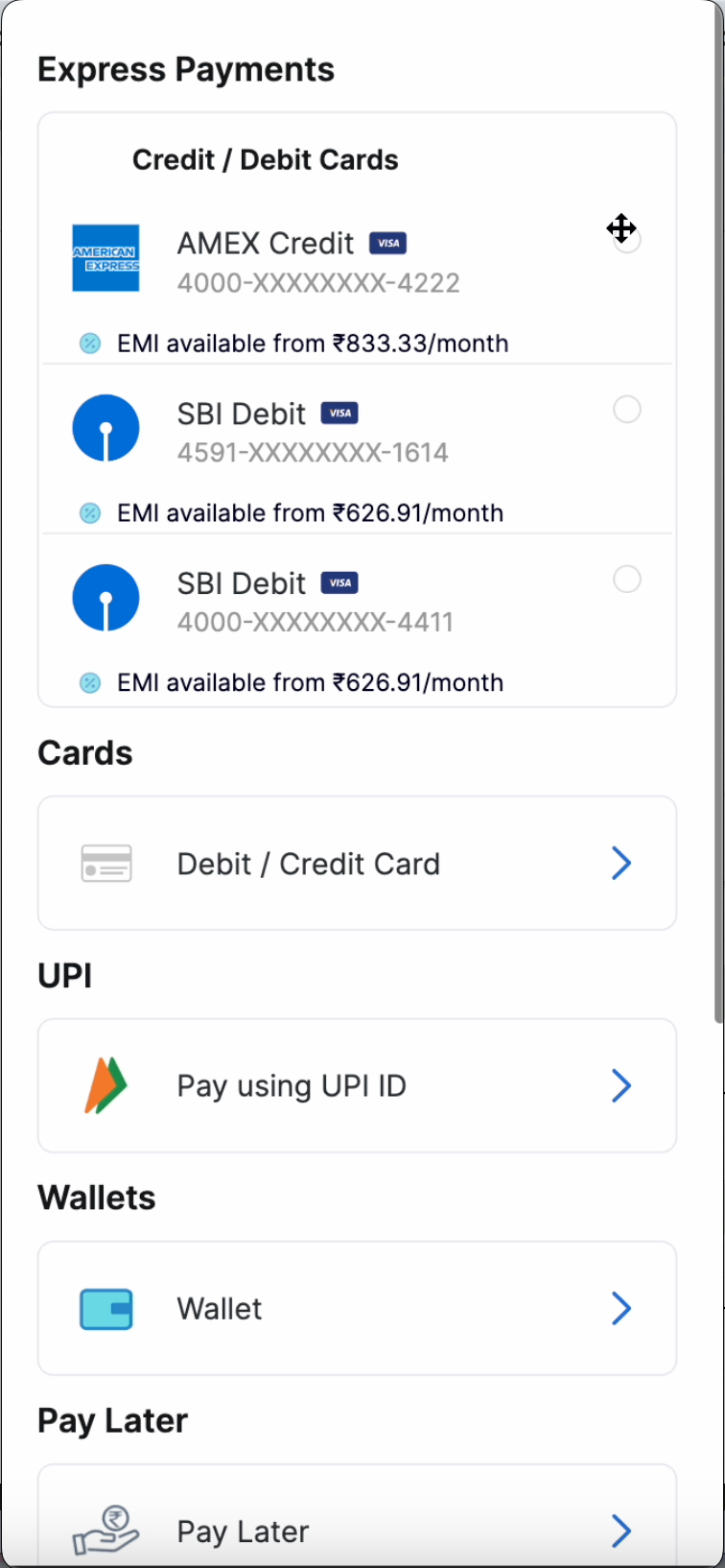
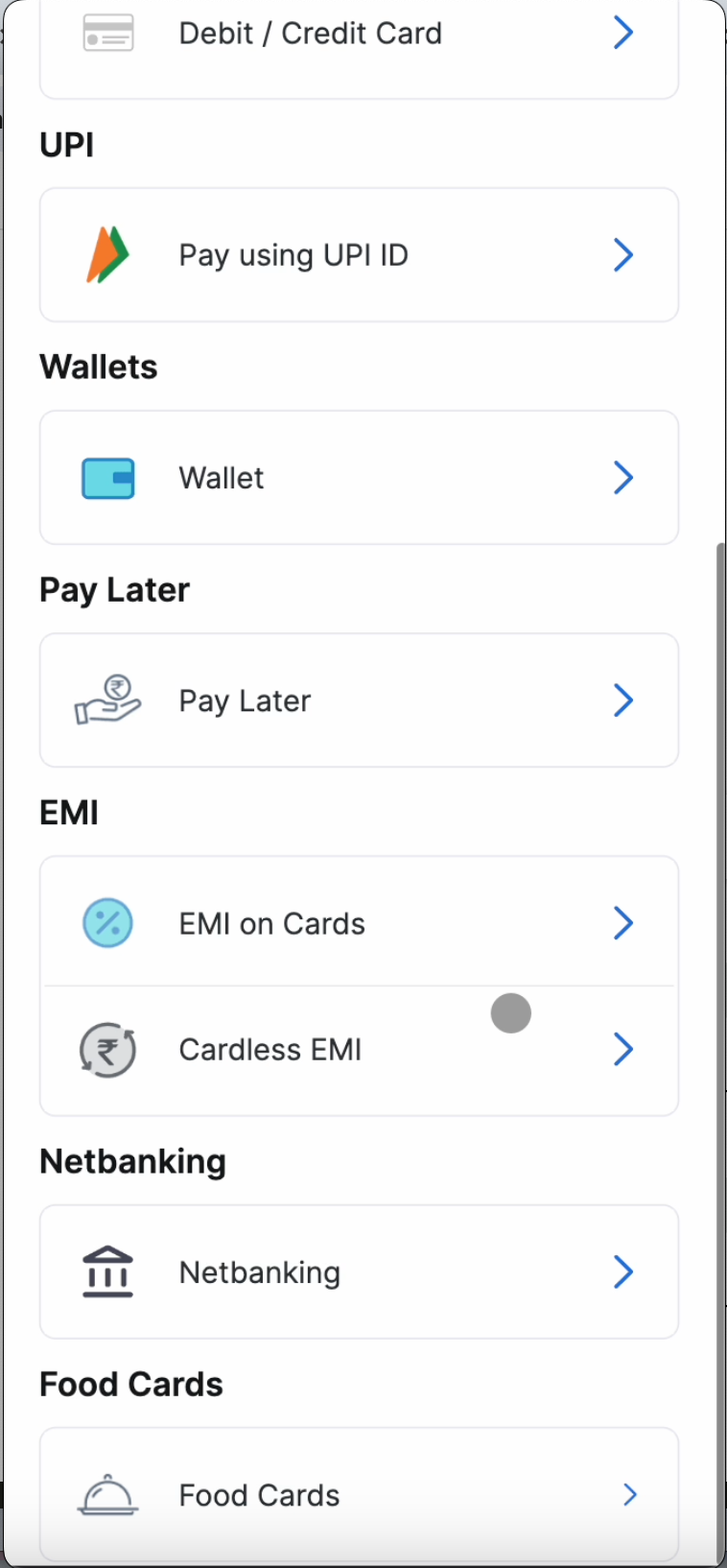
EMI Payment option can also be placed on the payment page to group visibility of all EMI plans in one place.
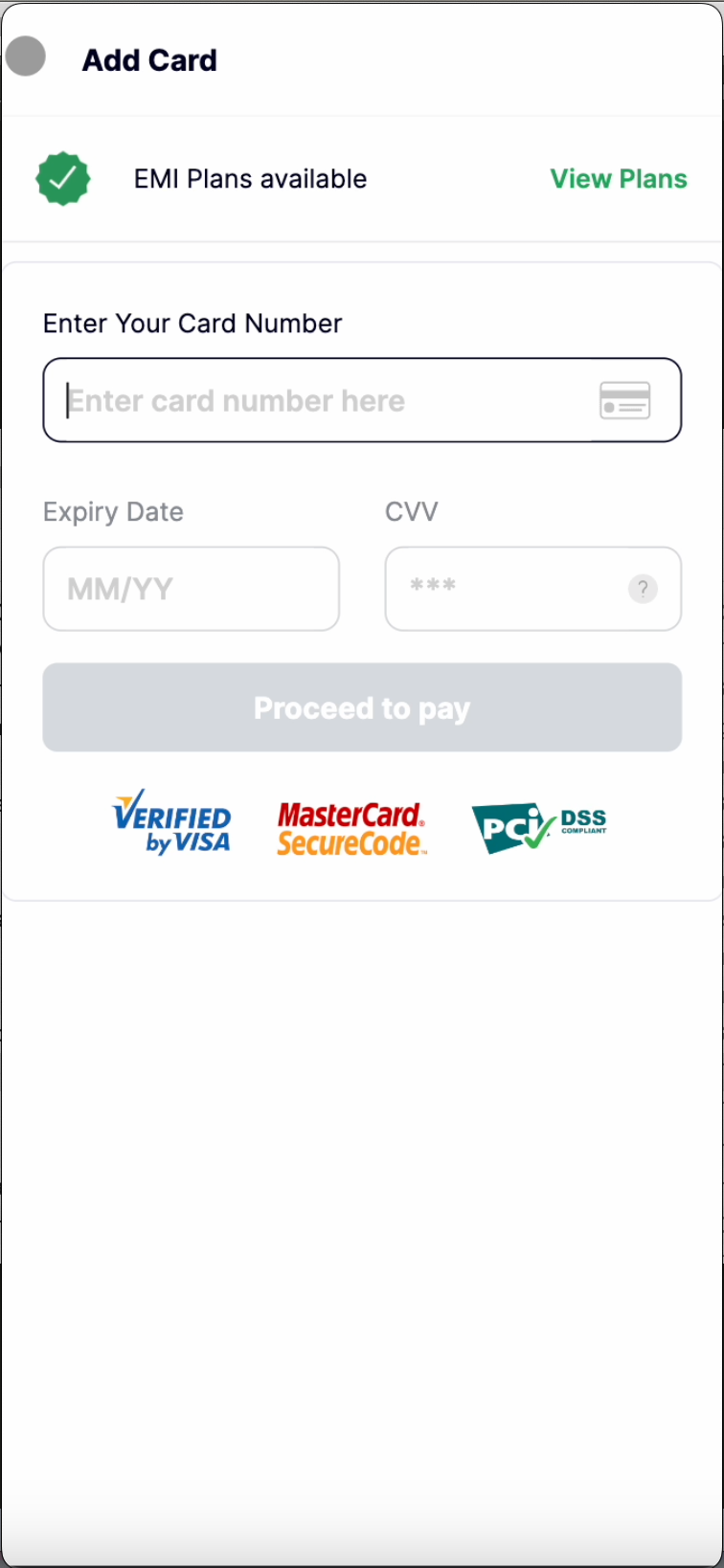
EMI plans availability will also be shown on the Add card screen so that users can check for EMI option while making a payment through new cards. Once the user selects “View plans”, various EMI plans will be listed to the user.
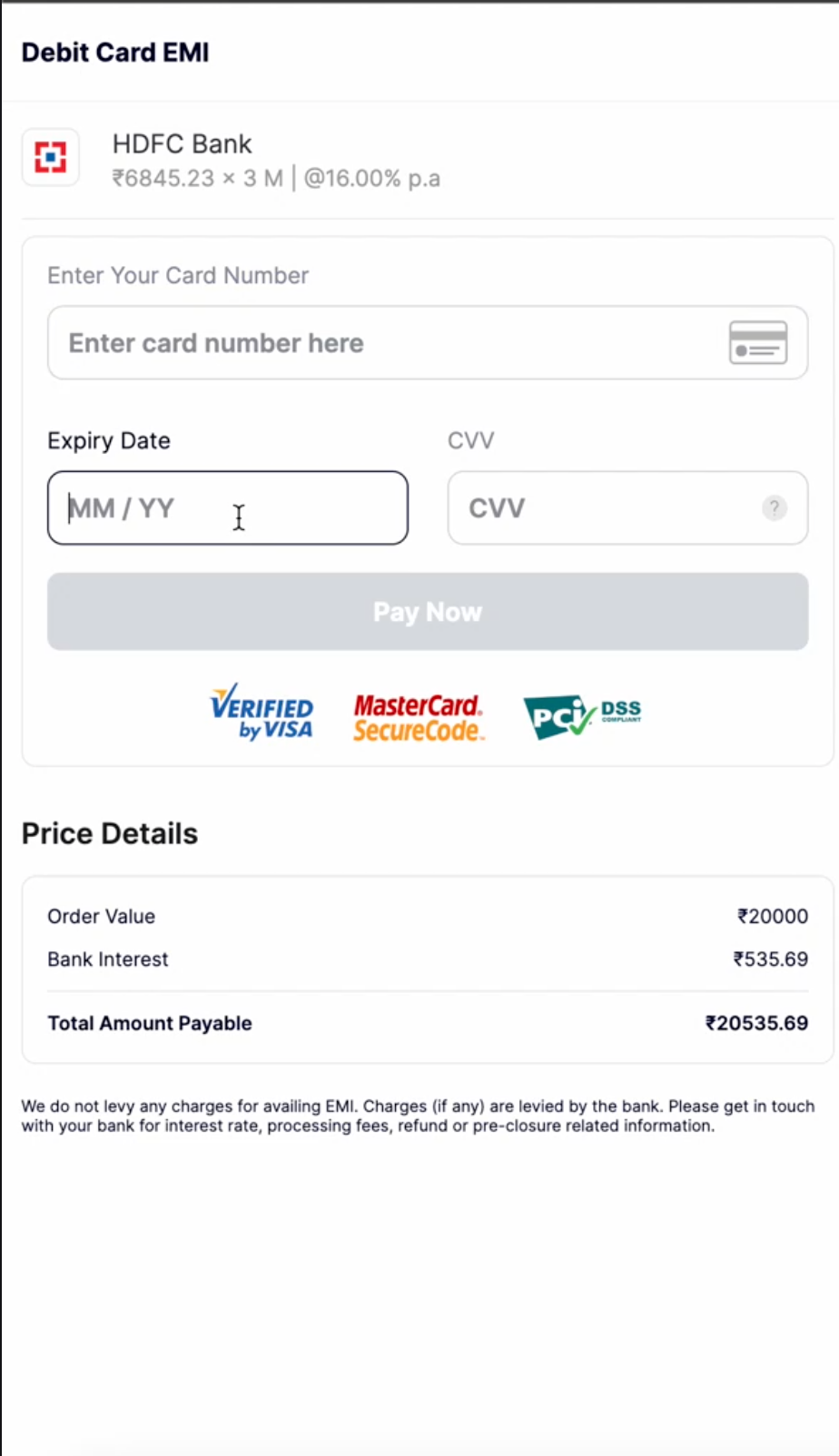
Once the an EMI plan is opted by the user, complete EMI details are shown to the user for complete transparency before proceeding to the bank page for OTP authentication.
Analytics
You can use the Transaction Analytics Module in Juspay Dashboard to monitor the traffic and performance of EMI transactions.