---
page_title: 3. Handle Payment Response
product: Hypercheckout
platform: iFrame Web
page_source: https://juspay.io/in/docs/hyper-checkout/iframe-web/base-sdk-integration/handle-payment-response
llms_txt: https://juspay.io/in/docs/llms.txt
product_llms_txt: https://juspay.io/in/docs/hyper-checkout/llms.txt
---


# 3. Handle Payment Response


### Step 3.1.  Handle Payment Events from Hypercheckout SDK


All payment responses are sent by the SDK in the hyperCallbackHandler under the `process_result` event.Implement the highlighted code snippet at your end for proper handling of all events and status


#### Code Snippets: -

#### HTML Code Snippet:

```html
// Callback handler for HyperServices events
        function hyperCallbackHandler(eventData) {
            try {
                if (eventData) {
                    const eventJSON = typeof eventData === 'string' ? JSON.parse(eventData) : eventData;
                    const event = eventJSON.event;

                    // Check for event key
                    if (event == "initiate_result") {
                        // Handle initiate result here
                        console.log("Initiate Result:", eventJSON);
                    } else if (event == "process_result") {
                        // Handle process result here
                        console.log("Process Result:", eventJSON);
                    } else if (event == "user_event") {
                        // Handle Payment Page events
                        console.log("User Event:", eventJSON);
                    } else {
                        console.log("Unhandled event", event, " Event data", eventData);
                    }
                } else {
                    console.log("No data received in event", eventData);
                }
            } catch (error) {
                console.log("Error in hyperSDK response", error);
            }
        }
```


### Step 3.2. Check Order Status


After being redirected to `return_url` from bank page, it is mandatory to do a Server-to-Server Order Status API call to determine the final payment status. Please ensure that you verify the order ID and amount transaction.Sample return_url: `https://merchant.shop.com/?status_id=21&status=CHARGED&order_id=guest-test-26&signature=wCFja5ZtDzm687LUxkqlw1NQYraC%2Bz540CitnlCouYI%3D&signature_algorithm=HMAC-SHA256`

To understand how to handle payment status, [refer to this section](https://docs.juspay.in/hyper-checkout/web/resources/transaction-status)
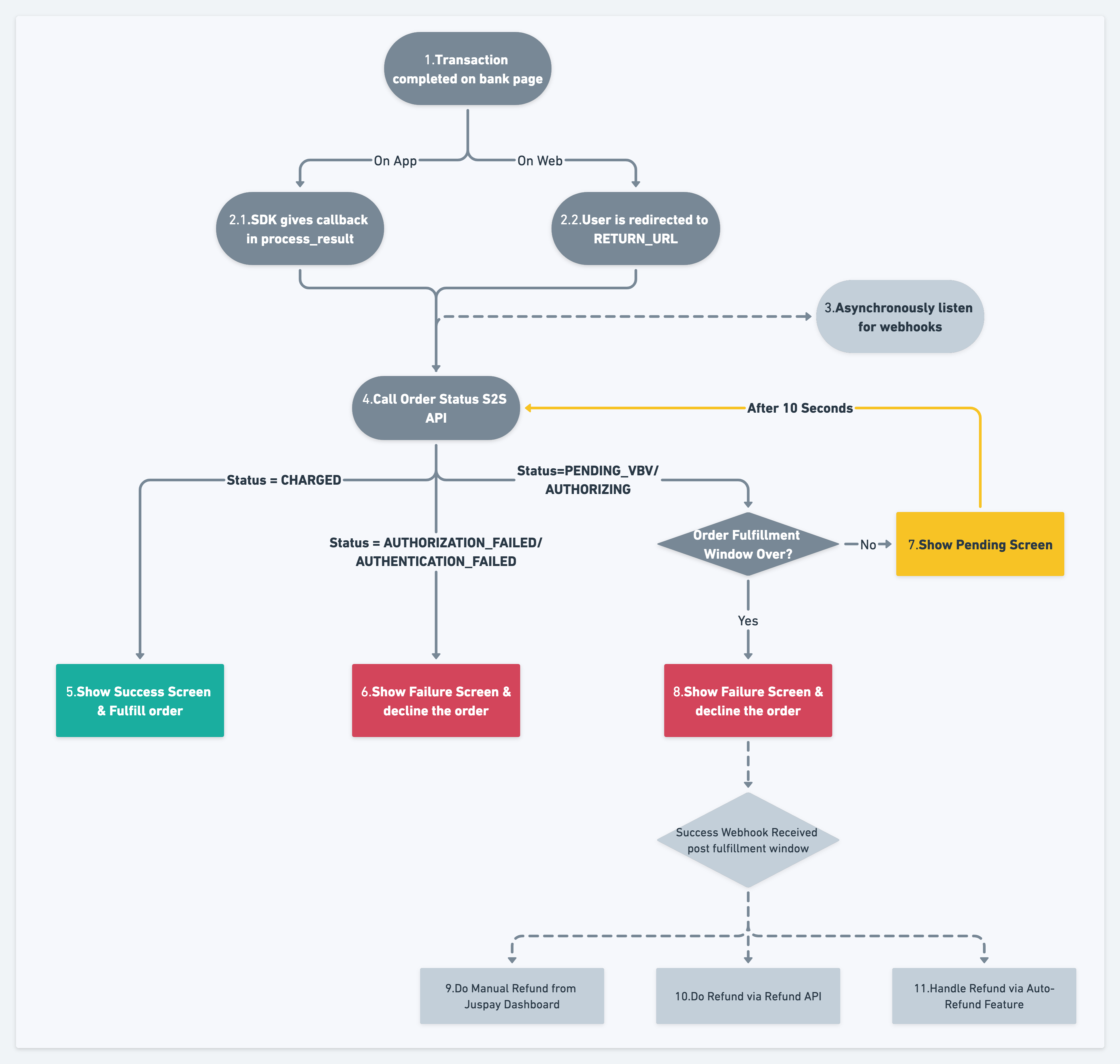
![Image](/images/payment_status_handling.png)


### Step 3.3. Display Payment Status


Once the payment status is determined via the API, the final status should be displayed to the user. This screen needs to be handled by the merchant, it is not provided by the SDK


---

## Complete Code Reference

The following code files are referenced in the steps above:

### index.html

```
<!DOCTYPE html>
<html lang="en">

<head>
    <meta charset="UTF-8">
    <meta name="viewport" content="width=device-width, initial-scale=1.0">
    <title>Juspay Integration</title>

</head>

<!-- Ensure that you invoke the initiate function at an earlier stage than the process function to facilitate the smooth loading of Hypercheckout -->

<body onload="initiateJuspayPayment()">
    <!-- block:start:adding-div -->

    <div id="HyperSDKDiv"></div>

    <!-- block:end:adding-div -->
    <button onclick="processJuspayPayment()">Start Payment</button>

    <script>
        // block:start:create-hyperServices-object

        let hyperServicesObject;

        // block:end:create-hyperServices-object
        // block:start:add-hyperServices-script

        // Calling the initiation script ahead of displaying the payment page.
        const script = document.createElement('script');
        script.src = 'https://payments.juspay.in/payment-page/HyperServices.js';
        script.setAttribute('clientId', 'yourClientId');
        script.setAttribute('service', 'in.juspay.hyperpay');
        document.body.appendChild(script);
        // block:end:add-hyperServices-script
        
        // block:start:call-initiate
        async function initiateJuspayPayment() {
            try {
                // Check if HyperServices is loaded
                if (window.HyperServices) {
                    hyperServicesObject = new window.HyperServices();

                    // Call the initiate function with the callback handler
                    hyperServicesObject.initiate({
                        "requestId": generateRandomRequestId(),
                        "service": "in.juspay.hyperpay",
                        "payload": {
                            "action": "initiate",
                            "hyperSDKDiv": "HyperSDKDiv",
                            "integrationType": "iframe",
                            "environment": "production", // Update sandbox for sandbox environment
                            "merchantId": "<merchant_id>", // Update this to your merchant ID
                            "clientId": "<client_id>" // Update this to your client ID
                        }
                    }, hyperCallbackHandler);
                } else {
                    console.error('HyperServices script not loaded');
                }
            } catch (error) {
                console.error('Error:', error.message);
                // Handle error as needed
            }
        }
        // block:end:call-initiate

        // Function to generate a random UUID
        function generateRandomRequestId() {
            return 'xxxxxxxx-xxxx-4xxx-yxxx-xxxxxxxxxxxx'.replace(/[xy]/g, function (c) {
                var r = Math.random() * 16 | 0,
                    v = c === 'x' ? r : (r & 0x3 | 0x8);
                return v.toString(16);
            });
        }

        // Function to process Juspay payment
        async function processJuspayPayment() {
            try {
                // block:start:fetch-process-payload
                // The session API should be called from your server, not directly from the client-side
                console.log('Call the server-side code to fetch Juspay session data');
                // Mocking the SDK payload for demonstration purposes
                const sdk_payload = {
                    "requestId": "8cbc3fad-8b3f-40c0-ae93-2d7e75a8624a",
                    "service": "in.juspay.hyperpay",
                    "payload": {
                        "action": "paymentPage",
                        "clientId": "<your-client-id>",
                        "amount": "1",
                        "merchantId": "<your merchant id>",
                        "clientAuthToken": "tkn_8e5c1540506c4829bda2e48b3c06e7cf",
                        "clientAuthTokenExpiry": "2024-01-04T14:28:18Z",
                        "environment": "production",
                        "lastName": "wick",
                        "action": "paymentPage",
                        "customerId": "testing-customer",
                        "returnUrl": "https://sandbox.juspay.in/end",
                        "currency": "INR",
                        "firstName": "John",
                        "customerPhone": "9999999999",
                        "customerEmail": "test@mail.com",
                        "orderId": "test_order",
                        "description": "Complete your payment"
                    }
                }

                process(sdk_payload);
            } catch (error) {
                console.error('Error:', error.message);
                // Handle error as needed
            }
        }
        // block:end:fetch-process-payload

        // block:start:call-process 

        function process(sdk_payload) {
            // Call the process function with the fetched sdk_payload
            if (hyperServicesObject && hyperServicesObject.isInitialised()) {
                hyperServicesObject.process(sdk_payload);
            } else {
                console.error('HyperServices not initialized');
                // Handle initialization error if needed
            }
        }
        // block:end:call-process  

        //  block:start:create-hyper-callback

        // Callback handler for HyperServices events
        function hyperCallbackHandler(eventData) {
            try {
                if (eventData) {
                    const eventJSON = typeof eventData === 'string' ? JSON.parse(eventData) : eventData;
                    const event = eventJSON.event;

                    // Check for event key
                    if (event == "initiate_result") {
                        // Handle initiate result here
                        console.log("Initiate Result:", eventJSON);
                    } else if (event == "process_result") {
                        // Handle process result here
                        console.log("Process Result:", eventJSON);
                    } else if (event == "user_event") {
                        // Handle Payment Page events
                        console.log("User Event:", eventJSON);
                    } else {
                        console.log("Unhandled event", event, " Event data", eventData);
                    }
                } else {
                    console.log("No data received in event", eventData);
                }
            } catch (error) {
                console.log("Error in hyperSDK response", error);
            }
        }
        //  block:end:create-hyper-callback
    </script>

</body>

</html>

```


---

## See Also

- [2. Open Hypercheckout Screen](https://juspay.io/in/docs/hyper-checkout/iframe-web/base-sdk-integration/open-hypercheckout-screen)
- [Error Codes](https://juspay.io/in/docs/hyper-checkout/iframe-web/resources/error-codes)
