---
page_source: https://juspay.io/sea/docs/dashboard-sea/docs/payments/priority-logic
page_title: Priority Logic
---
# A Configuration Guide
_**Payment Gateway Routing and Optimization in Juspay**_
**Priority Logic** is a gateway routing and decision-making framework in the Juspay Payment Platform. It allows you to define rules that determine **how payment transactions are routed across configured payment gateways** based on performance, business requirements, cost optimization, and fallback handling.
**By configuring Priority Logic, merchants can:**
* Improve **success rates** by routing to healthier gateways.
* Ensure **business continuity** during gateway downtime.
* Route transactions based on **payment attributes** (card type, issuer bank, PSP, etc.)
* Maintain **control and transparency** over gateway selection.
## Accessing the Priority Logic Dashboard
1. To open the Priority Logic Dashboard:**Juspay Dashboard → Payments → PG Control Center → Priority Logic**
2. Or navigate directly to:**[https://portal.juspay.in/gateways/priority-logics](https://portal.juspay.in/gateways/priority-logics)**
## 1. Dashboard Overview
-RyDIg.jpg)
### **1.1 Active Priority Logics**
The **Active Priority Logics** section displays all currently active routing configurations along with their real-time performance metrics. This view helps you monitor how each configuration is performing and how traffic is distributed across them.
| Field | Description |
|---|---|
| Configuration Name | Active routing configuration in use |
| Traffic % | % of transaction volume routed using this configuration |
| Gateway Undecided | % of cases where routing decision could not be determined |
| Performance Indicators | Real-time routing performance and health metrics |
### 1.2 **All Priority Logics Table**
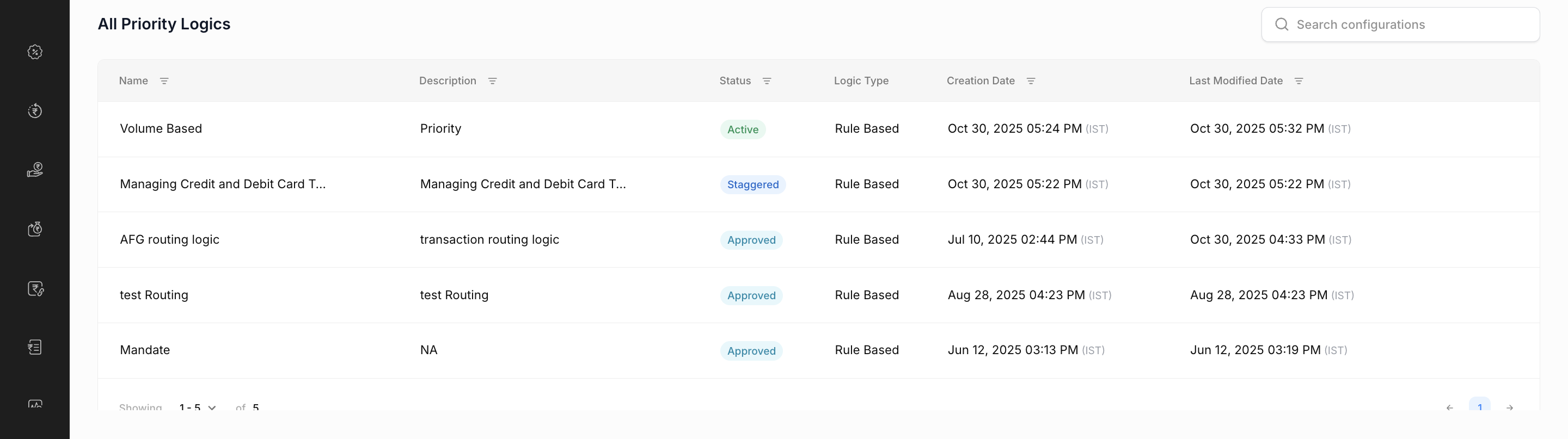
The **All Priority Logics** table lists every routing configuration created. This includes both active and inactive configurations, helping you view, manage, and track the full history of your routing logic setups.
## 2. Creating a New Priority Logic
You can create **three types of Priority Logic** configurations based on your business requirements:
[Video](https://dth95m2xtyv8v.cloudfront.net/tesseract/assets/dashboard-sea/3%20types%20of%20Priority%20Logic.mp4)
### 2.1 Advanced Routing
Offers maximum flexibility for defining routing rules using various combination of dimensions such as payment method, card BIN, issuer bank, and PSP etc..
Under **Advanced Routing** , you can choose between:
1. **Rule-Based UI:** Create rules using a visual drag-and-drop interface.
2. **Code-Based UI:** Define routing behavior using custom JavaScript code (requires additional approval in production).
#### 2.1.1 Rule-Based Priority Logic Configuration
Rule-Based Routing in Priority Logic allows you to define transaction routing conditions using a visual “**if–then** ” interface. This lets you control how **payments are directed to different gateways** based on transaction attributes for example, card type, card issuer, payment method, amount and more.
[Video](https://dth95m2xtyv8v.cloudfront.net/tesseract/assets/dashboard-sea/Advanced%20Routing.mp4)
> **Note**
> Configuring **Volume-Based Distribution** under this is **optional** . To get a detailed understanding[Click here.](https://juspay.io/sea/docs/dashboard-sea/docs/payments/priority-logic#2.3-Volume-Based-Routing)
#### 2.1.2 Code-Based Priority Logic Configuration
The **Code-Based Priority Logic** option allows merchants and developers to define **custom routing logic** using JavaScript. This configuration method is allowed only for certain advanced usecases, beyond what can not be achieved through the visual Rule-Based UI.
**Key Use Cases**
* Complex routing conditions involving multiple dynamic parameters
---
### 2.2 Default Routing
A simple, order-based routing strategy. Traffic is routed according to the priority order of gateways.
[Video](https://dth95m2xtyv8v.cloudfront.net/tesseract/assets/dashboard-sea/Default%20Priority.mp4)
---
### 2.3 Volume-Based Routing
Routes traffic across multiple gateways based on predefined volume thresholds. This helps distribute load evenly while maintaining optimal performance.
* Adjust gateway weights for performance or cost optimization.
[Video](https://dth95m2xtyv8v.cloudfront.net/tesseract/assets/dashboard-sea/Volume%20Based%20Routing.mp4)
---
## 3. **Core Concepts Behind Priority Logic**
### 3.1 Default Gateway Configuration
This is different from [Default Routing.](https://juspay.io/sea/docs/dashboard-sea/docs/payments/priority-logic#2.2-Default-Routing)**It is configured under** both **Rule-Based** and **Volume-Based Routing** .
.gif)
*Default Gateway Sequencing in Rule-Based and Volume-Based Routing*
It lets you set **fallback gateways** that process transactions when routing **rules configured do not matches** , ensuring smooth payment flow and uninterrupted service.
**Key highlights include:**
* Always-available fallback options to keep transactions flowing.
* Cascading fallback logic that routes through gateways in sequence.
* Emergency routing during outages to maintain uptime.
* Performance-based automatic switching for optimal success rates.
### 3.2 Managing Existing Priority Logics (View, Edit and Delete)
[Video](https://dth95m2xtyv8v.cloudfront.net/tesseract/assets/dashboard-sea/Viewing%20the%20Configured%20Priority%20Logic%20(1).mp4)
* **View a Priority Logic:** **00:00** Filter and select the configured Priority Logic you want to view, then click to view it.
* **Edit a Priority Logic:** **00:14** To make changes, create a copy of the existing logic, update the required configurations, and save it.
* **Delete a Priority Logic:** **00:47** Locate the logic you wish to delete, click the **bin icon** on the right, and confirm the deletion.
> **Note**
> Active Priority Logics cannot be deleted. **Deactivate** them first or **Revoke** in case of a staggered release.
### 3.3 Full and Staggered Release
* Under **Full Release** 100% of traffic is routed through the new configuration instantly.
* **Staggered Release** means **gradually rolling out** a new Priority Logic configuration to live traffic instead of activating it for all transactions immediately.
Only a **small percentage** of live traffic (say 10%, 20%, etc.) is routed to the new logic initially, while the rest still uses the old configuration.
[Video](https://dth95m2xtyv8v.cloudfront.net/tesseract/assets/dashboard-sea/Staggered%20and%20Full%20Release.mp4)
### Example Substep
You create a **New Volume-Based Priority Logic** :
Now, Instead of routing all transactions through this new logic immediately, you choose **staggered activation at 10%,** therefore;
* Only **10% of traffic** uses the **new routing** ; **90% continues** with the **previously configured logic.**
* This allows you to:
* **Test** the new logic with limited exposure.
* **Monitor** performance, success rates, and routing accuracy.
**Gradually increasing** traffic to 100% once verified.
### 3.4 Rule Configuration Options
When configuring a new rule within **Priority Logic** , several options are available to help you **manage** , **share** , and **enforce** routing behaviors effectively.
[Video](https://dth95m2xtyv8v.cloudfront.net/tesseract/assets/dashboard-sea/To%20share%20a%20rule%20we%20must%20have%20rule%20configured..mp4)
* **Import Rule** **00:00**
Use this option to quickly create or update a rule by importing a JSON file.
You can either upload an existing JSON rule configuration or manually write the JSON code directly in the editor.
* **Enable Enforce Rule** **00:18**
The _Enforce Rule_ option lets you strictly apply a particular priority logic without allowing fallback to other gateways.
* When enabled, transactions are **forced** to route only through the gateways or configurations defined in that rule.
* This ensures **strict routing enforcement** , maintaining complete control over transaction routing.
> **Note**
> Once enforced, there will be **no fallback** to other gateways if a transaction fails on the configured route.
* **Share Rule** **00:34**
The _Share Rule_ option allows users to export and share the configured rule in JSON format.
## 4. Use Cases
### Use Case 1 Gateway Performance Optimization
**Scenario** : Operations team needs to optimize transaction routing based on gateway performance metrics.
**Configuration** :
* Rule-based routing with performance conditions
* Gateway priority based on success rates
* Automatic failover for underperforming gateways
**Outcome** : Improved transaction success rates and optimized gateway utilization.
### Use Case 2 Business Rule Implementation
**Scenario** : Business team needs to implement specific routing rules based on transaction characteristics and commercial agreements.
**Configuration** :
* Transaction amount-based routing rules
* Card issuer and currency-specific routing
* Commercial agreement compliance routing
**Outcome** : Alignment with business objectives and revenue optimization.
### Use Case 3 Disaster Recovery and Failover Management
**Scenario** : Technical team needs to ensure business continuity during gateway outages or technical issues.
**Configuration** :
* Robust failover logic with cascading gateways
* Emergency routing during outages
* Automated recovery processes
**Outcome** : Business continuity during outages with minimized transaction failures.
## **5. FAQ & Troubleshooting Guide**
#### **Configuration Validation Errors**
## FAQs:
### 1. Why do I see “Configuration Name already exists”?
**Cause:** The configuration name you’re trying to use is already associated with an existing Priority Logic setup.**Resolution:** Each Priority Logic configuration must have a unique name. Rename your configuration and try again.
### 2. What does “Please provide Code field” mean?
**Cause:** A code-based configuration was submitted without valid JavaScript code.**Resolution:** Ensure the required JavaScript logic is added in the code editor before saving or publishing the configuration.
### 3. Why does it show “Need at least 1” for Default Gateways?
**Cause:** No default gateways are configured in your setup.**Resolution:** Add at least one default gateway. This ensures a fallback route for transactions that do not match any rule condition.
### 4. What causes the “Invalid Conditions” warning?
**Cause:** The rule’s conditions are incomplete or use invalid parameters.**Resolution:** Review all condition fields and ensure valid field names, operators, and values are specified.
#### **API and System Errors**
## FAQs:
### 5. Why does it show “You do not have access”?
**Cause:** The user account does not have the required permissions to access or modify Priority Logic configurations.**Resolution:** Contact your organization’s administrator to enable the **gatewaysPriorityLogic** permission on your account.
### 6. What should I do if I see “Something went wrong. Please try again”?
**Cause:** A temporary system or API error occurred during the operation.**Resolution:** Retry the action after a few minutes. If the issue persists, contact the support team with error details and timestamp.
### 7. Why am I getting “Error! Try Syncing again”?
**Cause:** Network instability or data synchronization issues between client and server.**Resolution:** Refresh the dashboard and attempt the sync again. If repeated, clear cache and re-login to ensure session validity.
#### **Code-Based Configuration Errors**
## FAQs:
### 8. What does COMPILATION_ERROR indicate?
**Cause:** The JavaScript code entered contains syntax or logical errors that prevent compilation.**Resolution:** Review your code for syntax correctness. Test or lint the code before submission to ensure successful compilation.
### 9. Why do I get a CODE_TOO_LARGE error?
**Cause:** The JavaScript code exceeds the maximum supported file size or complexity limits.**Resolution:** Optimize the code by removing unused logic, comments, or redundant functions. Consider modularizing complex logic into smaller parts.
#### **Gateway-Based Configuration Errors**
## FAQs:
### 10. What does INVALID_GATEWAY mean?
**Cause:** A referenced gateway is not recognized or properly configured in your account.**Resolution:** Verify gateway names and ensure they are active and configured correctly in the dashboard.
### 11. Why am I seeing GATEWAY_NOT_SUPPORTED?
**Cause:** The rule references a gateway that is not supported by your merchant account or by the platform.**Resolution:** Review the list of supported gateways in your account and update the configuration accordingly.
### 12. Why does it show “No Gateway Selected”?
**Cause:** A rule was created without selecting any gateways for routing.**Resolution:** Add at least one gateway to the rule to enable transaction routing through that configuration.